How to ROM Dronix onto Huawei Ideos U8150
The ROM is the soul of your Ideos. It controls how the phone performs and also what hardware features are accessible. You can install a great many apps to transform your Ideos into any one of a wide range of tools, but if a feature required by an app isn’t supported by the ROM, then it wont work. For example, a good number of Ideos phones support multitouch at the hardware level. However, the standard vanilla Android ROM that runs the Ideos does not support multitouch. As a result, pinch-to-zoom that is supported by apps such as Opera Mini and Google Maps does not work.
If you want to transform the ‘personality’ of your phone, then you have to change the ROM. This is known as ROMing. There are people that ROM their new phones as standard procedure not only to access functionality that doesn’t come standard, but also to feel that they have free reign over their phones. I stayed away from such radical customization owing to the risk of bricking a perfectly working phone. Besides, it wouldn’t have served any purpose beyond feeding my curiosity. However, over time my Ideos became sluggish, and boring. I’d go for days without tinkering with it to discover a new app, or new ways to customize it. And I was getting really pissed off at the sluggishness. So one day this here guy passed by my blog and mentioned Dronix. I hadn’t heard of it before and I liked the name right off the bat. I was hooked, and I went searching.
Dronix isn’t really that unique in the sense that most of its features can be found on other ROMs. But it does have that name… and it promises a significant speed boost. Among the features that it boasts, Dronix won me over on:
- Multitouch support
- Speed boost of up to 748MHz – My Ideos was previously running at 600MHz
- SSH support – allowing me to access the files on the phone over wifi, therefore avoiding the whole USB connectivity drama.
- Responsive user forum – very useful when you get stuck on something
- Extremely good reviews – especially from people who have tried out a number of ROMs
Before proceeding to describe how I went about ROMing, I’d like to mention that ROMing may go wrong in your particular case and leave you with a bricked phone. When you proceed with ROMing you’re taking full responsibility for anything that may go wrong.
Note that the PC portions of the process were done on Windows XP SP3. The experience is definitely going to be different if you’re working in a different OS. In addition, I hadn’t partitioned my microSD card so the swapping was straightforward.
Getting Ready to ROM
One thing that many how-to guides I came across failed to do was list what tools you require before beginning the process. ROMing is a delicate process and you don’t want to be discovering that there’s a critical tool you need to download, when you’ve wiped out your phone. So here are the items you should get before you begin:
- 4GB microSD card: The Ideos is typically sold with a 1GB microSD card. This is insufficient to support the ROMing process, so get a new card that’s at least 4GB.
- MyBackup Root: Very useful backup tool especially for data.
- Titanium Backup: A popular and comprehensive backup tool that’s great for restoring missing apps.
- UltraJack Recovery: This helps you perform two steps:
- Backup your current ROM
- Flash the new (Dronix) ROM
- Quick Boot: very handy in booting your phone into recovery mode
- Dronix 0.5: the ROM that you’re going to flash onto your Ideos.
- Stock ROM: this is the vanilla Android ROM that may come in handy should you run into problems and need to do a clean install of your Ideos. Hopefully it won’t come to this since you should be having your current ROM backed up and ready to restore your phone to its state prior to starting the ROMing process.
- Z4Root: It aids in rooting your Ideos prior to ROMing.
- PDAnet : It installs the USB driver that is required when setting up UltraJack Recovery.
- Sufficient free HDD space: During the ROMing, you’re going to do a lot of file copying between your Ideos and the PC. Make sure you have at least 2GB free on the PC hard drive for this job.
UPDATE (2011-12-11):
Some download links above stopped working recently so here are alternative sources for the files:
Stock ROM (no longer available. See update note below for new location)
UPDATE (2012-01-20):
Due to this week’s shutdown of MegaUpload, some more download links no longer work. The alternative file sources are:
Dronix 0.5 (link courtesy of Rooter in the comments – thanks!)
UPDATE (2012-02-09):
The Stock ROM can now be found at the location below. Use the link titled “U8150_STOCK_ROMS”.
UPDATE (2012-02-25):
ROM sites seem to be pretty unreliable! So now the latest working Dronix ROM source is linked below:
Dronix 0.5 (link courtesy of Fasih in the comments – thanks!)
UPDATE (2012-03-15):
Here’s another U8150 ROM source:
Dronix 0.5 (link courtesy of Satish in the comments – thanks!)
Backup n’ Stuff
Before you proceed in transforming your Ideos, it’s important to note down any important settings that may get lost in the process. In my case I noted the network APN for my 3G connection since I had read in the forums that a number of people had gotten stuck without 3G since they couldn’t remember what the APN setting was. I’m not aware what other settings may get lost, but I doubt they are many since the backup apps can capture most relevant settings.
- Rooting – almost all the steps to be carried out from this point on require that your phone be rooted. Rooting allows access to protected Android files. I rooted my phone a while back so I didn’t have to execute this step. I used SuperOneClick which worked fine, but was a bit complicated. A much simpler route to rooting is via Z4Root. I haven’t used it myself, but this video should help guide you through the process.
- Installing the larger microSD card
- Connect your Ideos to your PC via USB cable and turn on USB storage.
- Copy all the contents of the microSD card onto a folder on your PC (eg. C:\Backup\Ideos\microSD1GB\).
- Turn off USB storage and disconnect the phone from the PC.
- Turn off the phone
- Remove the old microSD card and install the new larger card.
- Switch on the phone and connect it to the PC
- Turn on USB storage and copy all the microSD files from the PC (C:\Backup\Ideos\microSD1GB\) to the phone
- Installing Custom Recovery
- Extract PDAnet to a folder on your PC eg. C:\Downloads\PDAnet_files
- Extract Ultrajack to a folder on your PC eg. C:\Downloads\UltraJack-recovery
- Enter bootloader mode:
- Turn off the phone
- Hold down the POWER button, the VOLUME DOWN button and the END CALL (RED) button simultaneously for 5 seconds. The phone switches on and gets stuck on the Ideos logo screen.
- Connect phone to PC via USB cable. The Windows XP Hardware installer starts up.
- Do not allow the installer to search for drivers. Point it to the location of the Android 1.0 driver – C:\Downloads\PDAnet_files\x86\usbwin to complete the installation.
- Open a command prompt on the PC and type the following:
cd C:\Downloads\UltraJack-recoveryinstall-recovery-windows.bat
- You’ll see the “sending ‘recovery'” and “writing ‘recovery'” messages and then the phone reboots.
- Backing up
- Install MyBackup Root if you haven’t done so already.
- Refer to this video for a demonstration on how to go about backing up your Ideos. Backup all the applications as indicated AND also backup all data.
- Install Titanium Backup if you haven’t done so already. I used the paid version, so it’s likely that some of what I describe may be different for you if you’re using the free version.
- Refer to this video for instructions on how to backup using Titanium Backup.
- Download the non-market version of Titanium Backup and copy it to the root of your microSD card. This is going to come in handy later when restoring apps and data.
- Install Quick Boot if you haven’t done so already
- Reboot the phone into recovery mode using Quick Boot
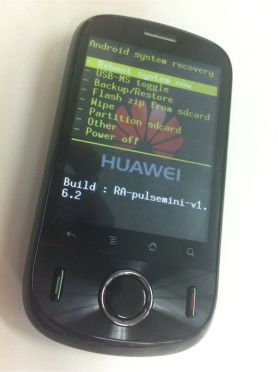
Ultrajack Recovery Screen on the Ideos
- Once the phone is in recovery mode, perform backup by selecting Backup/Restore > Nand Backup > Perform Backup > Confirm by pressing middle button in D-Pad.
- When backup is complete, reboot the phone by Volume Down button > Volume Down button > Reboot system now
- Once the phone has started, connect it to the PC in USB storage mode and copy over the contents of the microSD to a folder on the PC (eg. C:\Backup\Ideos\microSD4GB\)

- Make sure your Ideos is fully charged before proceeding to the next steps.
Finally, we can ROM
All the steps till this point are unlikely to lose you any data. With ROMing, however, everything is wiped out and replaced with the phone’s new personality. This shouldn’t worry you too much though since you’ve already taken a backup of the phone’s ROM, so it’s possible to recover your phone back to its original (before ROMing) state. The microSD is untouched by ROMing so all the files on it are going to be immediately available to Dronix.
- Connect your Ideos to the PC and copy the Dronix zip file (dronix_0.5_samnium3.zip in my case) and the Stock ROM zip file (U8150 V100R001C191B822(Australia channel sales).zip) onto the root of the microSD card.
- Reboot the phone into recovery mode using Quick Boot
- Flash Dronix by selecting Flash zip from sdcard > Choose zip from sdcard > dronix_0.5_samnium3.zip > Confirm
- Once the flashing is complete, reboot the phone by pressing Volume Down Button > reboot system now
- When my phone restarted, it reported that the microSD was damaged so I had to format it. This obviously wiped out all the files, but I wasn’t worried since I’d already taken a backup of the contents. After the formatting I rebooted the phone and then copied the files over from the PC back onto the microSD. The one thing I noticed during this process was that I no longer needed to have Quick Boot since Dronix has both Reboot and Recovery options on the Power menu.
- Restore basic settings:
- Set the Time zone and time format
- If your phone hasn’t picked up 3G yet, then set the APN to the correct value. In my case, the APN was automatically picked up from the network so I had internet access right from the start.
- Once you have internet access, you can set up the phone’s Gmail account. Without this, it’s very difficult to restore the rest of the data (especially contacts).
- The next thing I restored was wifi. I did this manually since I hadn’t reinstalled the backup apps yet. I wanted to have wifi running just in case I needed to download any apps.
- Restore backup apps:
- Dronix comes with File Expert already installed. Use this to browse to the root of the microSD and tap on TitaniumBackup_latest.apk to install. Dronix also comes already rooted, so you can go ahead and install any apps that require rooted phones without having to go through the rooting process.
- Use Titanium Backup to restore MyBackup Root by selecting Backup/Restore > Batch > Restore missing apps with data > Deselect all > MyBackup Root 2.7.7 > Run the batch operation
- Restore data – I had to learn the hard way that Titanium Backup wasn’t the best choice for data restore. When I restored my contacts, not only did the wrong information get associated with the wrong contacts, but the call log did not find matches in the contacts and then finally the whole phone app crashed. So I had to reboot the phone in restore mode and redo the flashing. After re-flashing, I restored the data a bit at a time using MyBackup Root:
- Restoring contacts – I do not synch my contacts with Gmail since it messes up by mixing phone and mail contacts. I prefer to leave mail contacts in mail and phone contacts on the phone. For this reason, my restore process wasn’t as easy as what I’d read on the subject. This is how I did it:
- Logged onto Gmail on the web and exported the contacts
- Enabled Google account sync on the phone
- Restored Contacts data from MyBackup Root by selecting Restore > Data > Local > (the most recent data backup) > Contacts > Ok
- It warns you that there are many records to be deleted. Allow it to proceed.
- Once the restore process was complete, I allowed the online contacts deletion to proceed to the end, after which I disabled account sync on the phone.
- Restored the online Gmail contacts from the earlier exported file
- Restoring contacts – I do not synch my contacts with Gmail since it messes up by mixing phone and mail contacts. I prefer to leave mail contacts in mail and phone contacts on the phone. For this reason, my restore process wasn’t as easy as what I’d read on the subject. This is how I did it:
- Restoring other data using MyBackup Root:
- Call log: Restore > Data > Local > (the most recent data backup) > Call Log > Ok
- SMS/MMS: Restore > Data > Local > (the most recent data backup) > SMS + MMS > Ok
- Calendar: Restore > Data > Local > (the most recent data backup) > Calendar > Ok
- Dictionary: Restore > Data > Local > (the most recent data backup) > Dictionary > Ok
- Turn on the overclocking – I also got my fingers burnt on this one. The first time round I had restored all apps and configured a number of them (eg. Go Launcher Ex) before tweaking the CPU frequency. The thing about these frequency settings is you never know what values your phone can handle until you try them out. So I kept adjusting upwards and all went well until I hit 748MHz. The phone simply rebooted, and I realized what the limit was. Unfortunately since SetCPU was configured to turn up the frequency on booting, the phone kept rebooting, and I had to restart it in restore mode and repeat the whole flashing process 😦 This is where the manual (without Quick Boot) way of booting into restore came in handy. I removed the phone battery and then put it back in, after which I held down the POWER button, the VOLUME UP button and the START CALL (GREEN) button simultaneously for 5 seconds. Once I completed re-flashing, I decided to tweak the frequency as early in the restore process as possible to avoid suffering too much of a set back if things went wrong:
- Restored SetCPU using Titanium Backup by selecting Backup/Restore > Batch > Restore missing apps with data > Deselect all > SetCPU > Run the batch operation. If you do not have SetCPU, there’s a link to it on my previous post about the Ideos.
- Disabled SetCPU’s Set on Boot so that if I accidentally hit the wrong frequency, the phone would only reboot once.
- Adjusted the frequency to 30MHz min and 729MHz max.
- The phone worked fine, so I re-enabled Set on Boot
- Restore all other missing apps using Titanium Backup by selecting Backup/Restore > Batch > Restore missing apps with data > (uncheck any apps that may no longer be required eg. Quick Boot) > Run the batch operation. This process is very smooth with the paid version of Titanium Backup. The free version requires you to keep responding to prompts for each app restored. For this reason you may choose to restore from MyBackup Root instead. I haven’t tried restoring apps from MyBackup Root, but I bet it’s pretty easy. The only app that completely failed to run on Dronix is Twitter for Android. It didn’t even show up on the list of apps.
- Restore System settings using MyBackup Root by selecting Restore > Data > Local > (the most recent data backup) > System Settings > Ok
- The ROMing is complete so you may now delete the Dronix and Stock ROM zip files from the microSD card using File Expert.
The Dronix Experience
So far I’m loving my phone’s new personality. It feels like I went out and bought a new Ideos. I’m constantly using it for all sorts of stuff. I also feel a deeper understanding of the workings of the phone and therefore less concerned about bricking it. One surprising thing I learnt is the fact that two Ideos (what’s the plural?) phones could look identical on the outside and have significant differences internally. For instance, there are some that do not have hardware support for multitouch.
The Dronix phone app allows typing a contact’s name to call. The contacts and calendar apps give me the choice of saving entries as either phone entries or Gmail entries. I like choice :). There’s even a web server, though I haven’t found use for this yet. I’m totally enjoying pinch-to-zoom which feels a lot more natural than using the zoom button. The camera seems to perform better too, but I can’t quite speak much on this since I take most of my pictures with an actual camera. I used the ROMing as an opportunity to try out a new Twitter client, and I must say Plume has been great.
There are kinks too. For starters, I’m not very fond of the way the phone sometimes hangs and has to reboot. Or the way some apps (especially Plume) just crash. This is something that I never experienced on vanilla Android, though I imagine that more polished versions of Dronix are going to iron out such bugs.
Is the phone faster? Well I haven’t felt like shaking it senseless yet, so it must be responding better. BUT. I would still prefer a much snappier response. Perhaps I’ve hit the limit of the Ideos when it comes to number of apps installed versus the desired responsiveness.
Leave a comment
Readers’ thoughts…
 | KalenGi on How To Slaughter A Goat (or Sh… |
 | Duncan Wanjohi on How To Slaughter A Goat (or Sh… |
| KalenGi on How to Add an Image Field to B… |
 | sjaeiou on How to Add an Image Field to B… |
 | bright on Huawei IDEOS U8150 – The… |
 | Buntu Dev on Huawei IDEOS U8150 – The… |



 alex the african
For a number of reasons I have yet to void my warranty! I really need to get the screen replaced while still under warranty then get to really having fun with the Ideos! Thanks much for this very informative post. I need to re-read it in a relaxed setting and work on ROMing my phone!
Hey Eric!
Use that warranty before it voids automatically 🙂 Yeah, you’ll have fun with ROMing when you get down to it. Let me know how it goes and whether it gives you a huge improvement in responsiveness.
i think i will try it now
Go for it! It’s quite an eye opener 🙂
Hello again Alex!
Well done on this very detailed guide to ROMing, you’ve just about covered everything a newbie should know. I wish I had read this before I ROMed mine, it would have saved me a lot of tense moments! 😉 Kidding aside, the ROMing bug has bitten me and I’ve tried out several other ROMs including the gingerbread (android 2.3.x) based ones which are still undergoing development now. One thing I’ve noticed with gingerbread is that it is definitely faster, but no one has released a stable, bug-free version yet. A very common problem with these ROMs is no haptic feedback on the soft keys and unstable wifi (I can’t live without wifi!) to name just two that I noticed right away. My informal test for speed was to load games and see if they are playable, that’s where the difference is apparent. Games that lag on froyo are playable on gingerbread.
The ROMs that I have found to be very stable are DroniX, Froyoman, AIB Cataclysm, Gnappo Ideos, Power Ideos, and Fusion Ideos. These are all froyo (android 2.2.x) based and should run in our u8150’s without any trouble. At the moment I’m enjoying the look and feel of Fusion Ideos, it has an awesome bootup animation and is very smooth in transitioning between home screens. Of course YMMV, as they say.
If you use the no-frills cpu app for overclocking you can avoid reboot looping as it has a built in safety mechanism that brings the clock frequency down to a safe 600Mhz in case the phone crashes.
We are learning a lot about our u8150’s! I can’t wait for a stable gingerbread ROM….
All the best again to you!
Hey Rooter!
Thanks very much! Yeah, I realized there weren’t any detailed one-stop kind of guides on ROMing so I went ahead and did one. You’ve totally pulled all stops on ROMing 🙂 I wonder how I can get a hold of that Fusion Ideos boot animation. I used to have a custom one on my previous ROM, but I haven’t restored it since ROMing Dronix. For the home screens, I use Go Launcher Ex. It’s extremely customizable and can be skinned.
Nice tip on No-Frills CPU. I had no idea it has a safeguard. Let me know when you come across a stable gingerbread ROM 🙂
my ideos is going crazy., its turning off and on., how can i fixed this? somebody help me plzzzzzzzzz…….
after i open it its restart automaticaly.,
Hi Jeck,
Did this behavior just start or was is after some recent change in configuration?
hello kalengi,
I’ve fixed it already, i didn’t follow the instruction i downloaded dronix 0.4 instead of 0.5.
Hey, that’s good news! So how did you get stop the repeated reboot?
how can i use a multitouchscreen on my Ideos? or can it be? my rom is dronix 0.5.4.
You can confirm whether your screen supports mutitouch by dialing *#*#2846579#*#* then selecting ProjectMenu > Veneer information query > Apparatus type query. Check the value under Touch screen type. If it’s synaptics then your screen has multitouch capability. To use it just run an app that uses multitouch such as Google Maps and use two-finger pinch gesture to zoom the screen.
Hi again Alex!
Yes, I’ve practically pulled out all the stops in my quest for a good ROM :-), I think I’ve tried them all except for the miui and htc sense ports which are still problematic. When backing up and restoring I find link2sd is an invaluable tool and the latest version has batch linking and auto-link as well which makes things faster. I’ve installed 49 user apps and using link2sd I still have 134MB available on the phone’s internal storage!
You mentioned that you have some crashes using DroniX 0.5, I think that if you set your maximum clock frequency to 710MHz, you’ll have more stable performance. My unit behaves the same, 729MHz works but there’s an occasional FC/reboot at that level.
On the gingerbread front, there has been a lot of exciting stuff happening with the Cyanogen 7.1 mod. I’ve just installed the latest build (10152011) and it works great! All sensors work along with haptic feedback on the softkeys and wifi works! There’s still a bug with sd card mounting but I know it’s being worked on. I was so excited to read about this version that I installed it anyway and I’m certainly not disappointed. Battery life was a concern for me on the latest version of Fusion but a guy posted on XDAforums that he was getting good performance on CM7.1 so I tried it. Oh boy, this ROMing thing has become like a vice for me. I’d better get back to work… 🙂
Cheers!
Hi Rooter!
Funny you should mention link2sd. I’ve been having low memory warnings, but I’ve been so busy lately I haven’t had time to dig up info on the best App to SD apps. Froyo has native support for this, but I’m avoiding it since it can’t move all apps. For example Google Maps takes up 10MB, but can’t be moved since it’s a system app. link2sd definitely sounds like it has what I want.
Thanks for the tip on CPU frequency 🙂 I’ll try it out and see how much it improves stability. My battery performance btw has been great lately.
Hey Rooter,
The 710MHz tip worked! The phone no longer freezes and the weird reboots have stopped.
Thanks!
*#*#2846579#*#* is not working. Nothings happen.
Do you mean that nothing happens when you dial the number? That would be the first time I’ve heard of that problem. Normally when you type in the code the phone immediately displays a menu for you to select the next option. BTW make sure you’re using the dial pad to enter the number.
if i want to flash my phone what are the steps
hi i downloaded dronix 0.5 and i installed it as well! everything was ok until i wanted to used wireless on my phone!
it tries to switch on bt it brings an error! is there a bug fix for this problem????
Hi Huzaifa ,
Perhaps the phone just needs a reboot. Also Try Quick Settings and see whether it can turn on the wi-fi. When I ROMed mine, the magnetometer stopped working so I fiddled around trying a number of compass apps and eventually it just turned on.
Hello,
I need help. I followed all the steps as it is. But, I am stuck now. After doing all the steps and flashing Droid 0.5 (given by the link here) the flashed was completed successful and then I rebooted the phone. First, the IDEOS logo came and after a while the “Android” written image appeared of the Droix and a shadow like animation over it keeps repeating. It doesn’t go forward. What can I do? Please reply asap.
Thanks.
Hi Zealous,
I’ve seen in the forums that sometimes the phone takes long to boot the first time after ROMing. This may be the case with yours so perhaps, you only need to remove the battery for about a minute, then put it back and switch on the phone. Give it time to boot.
hello,
First of all, thank you so much for such a prompt response. Guess what? I was kind of freaked out because I could not even load the recovery mode, but once I learnt to do that it was a safe ride because it didn’t take me more than 5 minute to restore my stock ROM and then trying again from there.
I waited for quit a long time and did try to remove the battery and reinserting as well. It didn’t work. I tried restoring stock ROM it did not work either. So, I downloaded Dronix from another link and installed it and it worked. One more thing, even after flashing the other ROM it took a long time and accidentally I touched the home key and the OS started..lol.. I don’t know if I had to click the HOME screen or it was just a co-incidence but that’s it. Although, I have a few question if you can answer.
1. How can I the DATA SERVICE IS DISABLED notifaction from the notification bar? (I’m always connected with WiFi and I don’t need data services all the time so..yeah 🙂 )
2. How can I restore the installed Apps and its data? (I made a backup with Titanium backup but I don’t know how can I restore the apps. I could only see angry bird game recoverable in the backup/restore tab)
3. The Android Version it says is now 2.2.2 before it was 2.0, but I was expected to see 2.3 (I know its a customization and that only but was just wondering) so is it normal?
4. There is a preinstalled app No-frills CPU Controller and I tried to overclock my processor but I didn’t see any difference in the performance while the videos on youtube related to this showed exceptional performance improvement. Do i need to change the minimum frequency as well? Or should I install any other app?
I hope I am not taking much of your time.
Thanks.
That’s great! Everyone’s experience is unique so you just have to be persistent and try a few ideas 🙂 Now to the questions:
1) I haven’t found a way to disable that app, since it comes in-built with Dronix. However it shouldn’t be a problem since it has the data service enabled by default.
2) If you had done a complete backup of all your apps before ROMing, then they should be available for restore. However, be careful with restoring data since the ROM is different so the data from the previous ROM may corrupt your new setup. This happened to me twice. It’s actually better to restore data using MyBackup Root.
3) Dronix is based on Android 2.2 so that is normal.
4) I also didn’t observe a really impressive change in performance, so I guess there is a performance boost, but not big enough to satisfy your response expectation.
Hello Bro,
Yes, I guess you are right and guess what? I already figured out how to remove that irritating thing out of my notification area. Well, basically, its just that there is a little update to the Dronix version that I downloaded from an official link. So now there is an Dronix 0.5.4 after 0.5.3. I downloaded that one and there is nothing bothering me in the notification area after I disabled the data services. Also, I have heard that it is a much more stable version than 0.5.3, these are not my words though as I just recently discovered and learnt Rooting, ROMs, etc. So, its my first experience.
and about performance, Yes, I guess you are right. May be, I was expecting a complete turn around, but some thing is better than nothing. So, overall, I am pretty happy with the experience. There are so many positive changes in Dronix that the stock ROM lacked I mean there are just so many 🙂 Like the home screen did not use to rotate when you tilt the phone, now it does with dronix. When I start dialing a number, if it matches my contact, it will be there as a suggestion and I can simply touch it to call. I am loving it….
Just to add, they were just some little neglect able changes that I mentioned…there are plenty more….. and massively impressive 🙂 The multi touch also feels good and it really gives a whole new feel to my phone…and one more important thing..I don’t think so there is much of a change in the keyboard…but I am typing with so much comfort in dronix…I don’t know any exact reason, but it really feels smooth typing with this keyboard. I am making almost no mistake.
Anyways hope more people like me discover what this little beast (U8150) is capable of.
best of luck guys.
& thank you the owner of this page. Your page is so helpful. The most comprehensive, step-by-step guide that I found on the internet.
Thumbs Up!
I couldn’t have put it better. The Dronix experience is simply Awesome. I haven’t upgraded to 0.5.4, but I’ll do so when I get an opportunity. Thanks very much for your appreciation and I’m glad to know the guide achieved it’s purpose 🙂
No problem mate. Loved your work. One more thing I want to ask though, I only have a 2GB memory card in my IDEOS right now so I have to save some space. I have created backup of everything into my computer’s harddrive. So, I want to move some backup and stuff from my memory card.
So, can you tell me where does the ultrajack recovery get installed? I mean, so that I won’t touch it and move all the other backup and delete it. I just want to make sure that my UltraJack recovery tool doesn’t get messed up as you know I won’t be stuck in the middle of nowhere if I have that tool. My ROM Backup files are more than 400MB that is why i want to move them but I am not sure if it would mess my ultrajack recovery tool.I can live without a ROM but not without that tool as i can just wipe the data anytime and install by downloading a ROM. If you know about it, please let me know. I would be really thankful to you.
Thanks.
That’s no problem. I think UltraJack installs in a location you can’t access, so you can go ahead and delete the ROM backups and that won’t affect UltraJack. I do that myself since I now take ROM backups every once in a while.
Hello,
I installed dronix following the steps you mentioned but after flashing it, I get the “android” load animation and it plays forever and the phone does not start ups
Help :<
Hello Weo!
Check out the comments by @zealous starting with this one.
He had a similar problem and his path to the solution might work for you. Off the top of my head, I’d say try taking out the battery, put it back in after a minute and start the phone to see whether it completes booting. Also, since you had taken a UltraJack backup, you can boot into recovery and restore your previous ROM in order to start over.
Hope it works out!
@ Weo
Yes mate refer to my comment and the things that Kalengi told. However, if you still find no luck, you can try downloading DroniX 0.5.4 because I had the similar problem like you and when I downloaded this one, it worked with no such troubles. Here is a link to ROM
Thanks much Zealous for the link to DroniX 0.5.4 🙂
Hello again Alex!
I’m glad that you’re running more stable now at 710 MHz, we really have to do a lot of trial and error steps with our phones. Lately I have been using the nightly Cyanogen Mod 7.1 (gingerbread 2.3.7) and been getting good results. Haptic feedback, multitouch, wifi and all sensors work. The only bugs are with barcode/QR scanner, FM radio and SD card mounting. There’s also a bit of audio distortion but it’s easy just to turn down the volume levels. It seems that the PC won’t load the necessary drivers to mount the SD card unless you are using Windows 7. If you try using barcode scanner it breaks the camera app and you have to reboot. However the phone works great otherwise and it’s definitely faster. Aside from ROM’s I’m also now using the V6 Supercharger tweak and I’m in the process of trying to configure the Loopy Smoothness script. It’s all deeper technical stuff now and I had to scour XDA forums to find out how to install the tweaks but it’s paid off. I don’t know exactly how these scripts work but they manage the memory without you having to kill apps manually and also keep the launcher from getting killed and restarting itself which slows down the phone big time.
I’ve also noticed that some of the lag in our phones is caused by the launcher. At first I thought that using the leanest launcher available would speed things up but it didn’t. I’ve tried Zeam, Go Launcher, ADW, Launcher Pro and Launcher 7. Surprisingly Zeam is rather choppy when scrolling through homescreens even though it’s the leanest. Launcher Pro is the smoothest for me but it doesn’t have the features of Go Launcher or ADW like lockable homescreens, which is very convenient if you’re fumbling with the screen because you don’t end up moving or deleting icons unintentionally. Since I like to scroll through my homescreens smoothly, I’m sticking to Launcher Pro. Now my phone has minimal or no lag when it’s unlocked (woken up from a sleep state) or when I just finish using an app that consumes a lot of RAM.
I noticed it mentioned here that after flashing a ROM many see the animation run for a long time. It can take a while for the phone to configure after a new ROM is flashed. In my experience it sometimes takes more than five minutes which seems like ages! What I do is let the animation keep running, more often than not it will eventually boot up. If the animation stops moving altogether, that’s when I take the battery out and start again.
Anyway, that’s the latest I’ve experimented with so so far on my U8150. Wow, when I first got it, I was a little disappointed but now I feel like I really own it!
Hey Rooter 🙂
Thanks for the update! Seems you’re having more fun tweaking the phone than actually using it 🙂 When you say the you’re on the nightly Cyanogen builds, do you mean that you ROM the phone every day? I might try out the V6 Supercharger since memory management is a big concern for me. Sometimes I find there are apps in memory that I haven’t run and have to kill them manually.
I settled on Go Launcher since it’s a great compromise between responsiveness and features.
“It can take a while for the phone to configure…”
That’s exactly what I’ve been suspecting on the boot delay. I think what happens is that those who are new to ROMing don’t quite know what to expect, so when the phone takes so long to boot, they figure something went wrong. It also shows just how different the phones actually are at the hardware level. If they were all identical in build, then everyone’s ROMing experience would be pretty much the same.
“…now I feel like I really own it!”
You’ve just nailed it right there! I felt exactly like that after ROMing and tweaking the phone. The phone was finally mine, and doing what I wanted the way I wanted it. BTW I’ve been getting very good battery performance lately. The best so far was a few days ago when it did 56 hours straight and still had 14% charge remaining. The frequent reboots were responsible for short battery times before I lowered CPU the frequency. I’ve also realized that if you have the option of using wi-fi, then pick it over 3G since the latter is a lot heavier on the battery.
wow. seems like a lot of newbies like me wil learn a lot with help of above conversations. just for the recorde though, i believe the startup screen really stuck because i litreally noted down the time. First i waited for 15 minutes then noted for further 30 minutes to make sure that i give it proper time. 🙂 but even with the other rom version it took 5 minutes to start 🙂
Hello Alex,
Yes, it seems as if I’m flashing a new ROM every night! :-), Actually I usually try the nightlies as soon as they come out to see how they work on my phone and it looks like things are really moving on the development front, though there’s no stable gingerbread port yet! If you check on XDA forums you’ll even see talk about porting over ICS (Android 4.0) for the u8150!
I stopped using the CyanogenMod nightlies for a while because I needed all my phone’s sensors to be functional and to my pleasant surprise I found that Esteban Sannin had released Dronix 0.5.4 FAST, so I flashed it and wasn’t disappointed. It’s very smooth right off the bat. I use it without any tweaks and even with more than 60 apps installed it was quite snappy. I think that the fast version is a leaned out version of the the standard. I tried to check on the forums exactly what he had done but my italian is not very good and whenever I use a translator it seems to come out more encrypted.
So I thought that would keep me off the nightlies for a while until today when I took a peek at the Dronix development site and saw that Dronix 0.6 Ginger is out albeit a raw version, and we should expect some bugs with this one. Just finished
downloading and installing it, let’s see how it fares. Titanium backup and link2sd are a must for us chronic ROM flashers!
Cheers!
Hi Rooter,
Dronix 0.6 is something I’d love to try out once it’s stable. It would be worth the hassle given that ICS is the first version of Android that works on both phone and tablet. I finally got round to installing Link2SD! It’s such a relief to be having all that free memory once again 🙂 I don’t even notice a difference in the performance of the apps now that they are being loaded off the SD.
I also came across the answer to why the Ideos has such varying CPU capability across individual phones. It’s related to the process of binning. The U8150 CPU is guaranteed to perform at 528MHz, but is actually capable of higher performance with the limit being different for individual CPUs. So while mine was unstable at frequencies above 710Mhz, others are capable of 748MHz. Now that’s some info I’d never have bothered digging up if I hadn’t ROMed 🙂
Happy ROMing!
1. I had installed 0.5.4 (downloaded from http://www.megaupload.com/?d=3MHP24K4)
2. The battery think didn’t work. :-<
So, did downloading the newer version worked for you? I’m pretty sure it would.
No, still the same issue
Also I tried restoring my rom but I get an error…
Could you describe step by step what process you’re following to restore the previous ROM and the error you’re getting so I can get a better idea of what might be happening.
1. Booted into recovery mode (power+vol up+green call button).
2. Backup/Restore > nand restore > mem-211M > BCDS-20111110-0919 >. Confirm
Error that occur is
“Oops… Sometthing went wrong! Please check the recovery log” but I can’t find where this log is…
I installed dornix 0.4 and it is working fine, any idea why 0.5.4 isn’t working?
Now that’s a a strange issue. Did you try 0.5 (the one linked to in the tutorial)? What puzzles me most is that your original ROM backup did not restore. It could well be that there’s a problem with the microSD card and the ROM images are getting corrupted when copied there. You could try using a different microSD and see whether the issues goes away.
Also, after trying the SD card thing mentioned by Kalengi, I believe that you can download a stock ROM of your mobile phone without much trouble. Right kalengi brother?
Agreed. Trying out the stock ROM could help in pointing to the source of the problem.
That one works fine, I think I’ll go with it 🙂 Thanks every one for help
Great! Glad to be of help 🙂
Just wanted to know, will the themes (that worked with 0.4) also work for 0.5 ?
I haven’t tried out Dronix themes so that I can’t tell.
Glad to hear that the thing worked out for you Weo. By themes, do you mean the icons theme pack? If that’s what you mean, then Yes I have currently the ice cream sandwitch theme pack installed on my Dronix 0.5.4. So, hopefully it would work on 0.5.0 as well?
Hi Zealous
(1. How can I the DATA SERVICE IS DISABLED notifaction from the notification bar? (I’m always connected with WiFi and I don’t need data services all the time so..yeah 🙂 )
Try this: Settings > Dronix > Unchecked Data Icon and then reboot., hope it helps.,
Hi please tell me how to remove the “Dronix system start…” screen.. I want to change it with something else.. I have successfully changed the boot animation but not this.. please help!
Hello @powerinside,
In the original Ideos ROM, the logo is located in /cust/hw/normal/logo/ and is called oemlogo.mbn. I’m not sure whether this same scheme is maintained on Dronix. If it is then you just replace oemlogo.mbn with your own image.
Good guide. Too bad I didn’t read it before flashing my phone, lost some stuff. I’m having problems with USB tethering. It used to work before but with Dronix 0.5.4, it doesn’t work anymore. Do you have a fix for this?
Any possibility you could write a guide for reverting to the Stock ROM, considering the fact that I didn’t backup my ROM before flashing?
Hi Setsuna,
I’m still on Dronix 0.5, so I haven’t had the chance to get a feel of the quirks it has. @Rooter and @Zealous seem to have had success with it so perhaps re-flashing would produce better results now that you’re more familiar with the process.
These are steps I’d follow to revert to Stock ROM:
1. Refer to the step “3. Installing Custom Recovery” to get Ultrajack setup
2. Download the Stock ROM and save it onto your microSD
3. Reboot into Recovery mode and flash the Stock ROM as described under “Finally, we can ROM”
After that you should have your Ideos on vanilla Android. Of course this process assumes you just want to start from a clean slate so all data and settings on the old ROM are lost.
Hi Setsuna,
I find that wiping data/factory reset and wiping the dalvik cache before installing a ROM clears out any wifi issues you may encounter. Dronix 0.5 and 0.5.4 are very stable on my u8150 and I’ve tested wifi hotspot/tethering on them without any problem. I’m not sure if the data wipe option is available on ultrajack (I’m using clockworkmod recovery) but I can switch from froyo (android 2.2.x) to gingerbread (android 2.3.x) ROMs without having to flash a stock ROM in between). Wiping clears out any residual data that may cause problems when transitioning to a new ROM. A lot if issues can occur if we try to transfer user settings from an old ROM to a new one (believe me, I’ve tried it!), so I usually just restore my apps using a backup and manually restore wifi and other settings. Hope this helps and all the best to you 🙂
Thanks for the replies.
Some update on my issue: I installed the Wired Tether app to see if I could re-enable usb tethering but I got a message that “the kernel does not have the necessary feature for tethering”. So from the Dronix settings menu, I changed the kernel to standard and restarted the phone but it just hang at the boot animation screen. I re-flashed it with the stock rom and got it working again. I tried usb tethering and it worked OK. After that I used z4root to root my phone after which usb tethering stopped working and Wired Tether gave the kernel error. So i guess the rooting process is the problem. Anyone else with this issue? If so, any solution?
By the way, hotspot tethering works OK, so that’s what I’m using for now.
Wired Tether : http://code.google.com/p/android-wired-tether/
how do i download dronix 0.4 safely
Hi Sunndia,
Information for Dronix 0.4 can be found on this XDA-Developers forum
Kalengi,
Wow.. thanks man!! you just gave the most detailed and step by step guide to roming.. I really had a hard time and was trying to learn for 2 days but didn’t find a forum that gave detailed instructions.. but yours hit the spot! thanks very much!!
can you give me a link to a stock rom?? all the links I’m getting are updates.. are updates ok?
Rooter,
Can you please post a link of the cyanogenmod you’re using? I’ve tried everything the instructions said and it doesn’t flash, I think the rom I downloaded is the issue..
Ultrajack does have dalvik cache and factory reset, I’ve done those and in doing so I’ve lost my touchpal.. -_-
but still wasn’t able to install cyanogenmod.. please help me..
P.S. to all..
I’ve just learned 2 days ago about roming, just bought this 4 days ago and yeah, bye2 warranty, 🙂
this is the best forum ever, I hope this continues so you ppl can help more newbies.. ^.^
more power.. yeah.. thanks again kalengi..
Hi Bintoten,
Thanks very much for the appreciation! Yeah, seems the file host for the the link in the article is down or something. I’ve uploaded the copy I have to a temporary location. Download it from here.
Glad you found the guide helpful 🙂
Thanks again!! 🙂
umm.. if it’s not too much to ask, can you answer my questions to rooter? 😀
I’d be glad to, but I haven’t worked with cyanogenmod. I’m Ultrajack all the way until it lets me down 🙂 Link2SD is on Android market. It’s a popular app, so you won’t miss it when you search for it using the market app.
Thanks thanks.. ^^
I’ll try tweaking here some more.. 🙂
and a link to link2sd pls.. :DDDD
You could simply use rom manager. I followed this guide in October. Yesterday I had to improve my friends phone for him. I found that the Ultra Jack Recovery link was dead. So were all links online.
I was frustrated and found myself stuck. I decided to try Rom Manager & also used My Backup Root only.
Simple as hell to do, fast, uncomplicated and automated. Though this method(the long one above) helped my commerce-oriented mind understand my phone.
WORDS OF ADVICE(If nobody’s suggested it already): Use ROM MANAGER
Hi Muriithi,
Thanks very much for the heads up on UltraJack Recovery. It seems the files hosted on that server are having a problem. I’ve uploaded my copy (version 6.2.2) to a temporary location and you can download it from here.
I haven’t used ROM Manager, but I’d say any tool that helps shorten or even just smooth out the ROMing process is worth a try. Thanks for the tip 🙂
ppl!! help.. do you guys know how to remove the stock apps(google maps, google search)
it just uses a lot of ram.. it’s so irritating to have to kill tasks always.. I’ve been researching but can’t find any help with ideos, it seems this little phone is very uniquely rare.. 😀
can you guys help me?? I already know how to use adb, what I’m asking is some codes to do for this phone.. remounting, deletion by adb etc.. Help please please.. T.T
Also do you guys have any tips on how to further speed up the phone? 😀
ROOT EXPLORER apk(apk is the android app format) – download manually(by googling root explorer apk and downloading it from file hosting sites) if you want it free since it’s a paid app.
You use it by deleting the apk files from the ‘app’ file of the ‘system'(different from the ‘sys’ folder)
I’ve removed maps(and all maps related apps), email(remained only with Gmail and yahoo app), documents to go(using office suite pro downloaded as apk), news and weather, music app(using real player beta and winamp pro), messaging app(replaced with handcent SMS that allows me to lock my messages) and many other useless stock apps.
My phone memory stats are always between 40-60mb out of 150mb free because of this.
Muriithi,
LOL.. thanks.. It worked!! I was able to search an alternative using adb which is a very very very long method.. good thing I found your post first before I started doing anything.. anyway.. this is what I found for u8150..
This should be done in adb
1. Enter shell mode by typing:
adb shell2. Type:
su3. Then Type:
mount -o remount, rw /systemThis Remounts the system into RW
4. Type:
cd system/appThis takes you into the system/app folder
5. Type:
lsThis will show you a listing of the apps (.apk files) in the folder
6. Type:
rm [filename]where
[filename]is the name that was listed in step #5This deletes the application permanently from your phone
If in step #5 there was a .odex file as well as .apk then delete that too using: rm
I forgot my source for this.. 😀
but thanks to the source if he/she reads this.. I compiled those to work in u8150 because a lot of which I’ve researched don’t work with u8150(special phone) 🙂
Anyway.. thanks for the saved time muriithi.. didn’t know there was a useful app like that.. google doesn’t make life “that” much easier for hackers.. 🙂
Thanks Bintoten! I’ve added numbering so it’s clear what steps you’re refering to.
ok.. gaming with Cyanogenmod 7.2 IS faster in gaming.. actually its the gingerbread that made it faster because of its specs. and new developments.
this is a description for the gaming section of the improvements made in gingerbread. http://developer.android.com/sdk/android-2.3-highlights.html#gaming
Cyanogenmod 7.2 Download
This one works.. 🙂
it’s the latest before the upcoming Cyanogenmod 9 ice cream sandwich.. ^^
and actually, cm can be installed with ultrajack.. ^^ just have to do the same steps and improvise
just sharing what I’ve learned so far.. but dronix looks better for me, and is more stable.. cm sometimes crashes and you have to “force close” it, particularly in settings and with adapting to new downloaded apps.. gonna try android HD, leandroid and fusionideos next..
Hi Bintoten,
So basically Cyanogenmod is the recommended ROM if you’re primarily going to be playing games on your Ideos. Yeah, Dronix is very stable. Ever since I found the right CPU frequency for mine there are no more force closes and reboots. Thanks very much for the link to a working Cyanogenmod ROM!
Hello Bintoten,
I’m sorry for the rather late reply, I’m currently running CyanoLucky SmartIdeos V2 because I find it to be the most stable so far except for barcode scanner, volume and usb mounting. The latter versions have barcode scanner and usb fixed but the light sensor and softkey backlight are broken. You can also check this link out: Listing of Custom ROMs
It’s quite up to date and even includes some of the ICS ROMs 🙂
Elp Rooter!!,
Can you get my wifi working in cyanogenmod 7.2nightly? T_T
I like games but I can’t live without wifi..
hi rooter i too tried cyanolucky smart ideos v2 rom.it it is very stable and usb mounting problem is cleared by enabling and disabling tethering option .u also try that ,it worked for me and i have market and gmail account issues.Have u cleared those issues? .give any suggestions to avoid them coz i want to download apps from market .thankyou
Hi,
I found a smooth way to mount my card via USB. I installed switch pro widget which is a very detailed version of the power control widget. It has a mount USB option. It works way faster.
I hope this helps.
how’s cyanolucky? :)))
Hi Bintoten,
You can try a factory reset to get wifi working again but I’m not sure what could be breaking your wifi on CM7.2. Cyanolucky V2 is stable for me, no problem with wifi (can’t live without it either :-)) and all sensors work. I alternate between this ROM or DroniX 0.5.4. Cyanolucky is good for gaming since it’s also a gingerbread ROM. I just tried LEANdroidMOD_3 a while ago, quite snappy as well, has a different theme from DroniX and fully functional. After I flashed it, it automatically configured its 2G/3G connection to my provider which was a nice surprise. It’s very lean so it boots up fast after the initial bootup, although it can only overclock up to 691MHz
kalengi.. there’s a dronix 0.6 in rooter’s link.. 🙂
Yeah, I’ve just had a look at the list. Very helplful ROM listing Rooter, thanks very much!
You’re welcome 🙂
BTW you can also get the latest DroniX info/downloads from the developers page: http://esteban.homelinux.org/index.html#dronix
That page doesn’t seem to be saying much. I don’t read Italian, but there’s just two paragraphs on it. The Download page, however does have all the Dronix ROMs.
hey alex the pdanet doesn’t download as a zipped folder but rather as a RAR folder is there any other download site
Hi Kibab,
The RAR file is OK. There were two download sources when I was getting the file and both had RAR file format. Do you have trouble opening RAR files? If you’re on Windows, Winrar can be downloaded free from their site.
yes i have a problem opening my friend please need help!!!
Have you checked the Winrar website? Google it then download and install the latest version. After that you should be able to open RAR files.
Thanks working on it downloading winzip 160
Can any one help me pls. I have Huawei Ideos U8150 and when i press the power button it shows a red blinking light and nothing to display so what can i do? pls email me with this email fullmon@gmail.com Thanks a lot
The guys at XDA Developers most likely have a fix (or at least an explanation) for that.
Hey, the red blinking light is a sign that the battery is below 10%.
It could serve as a clue. Your problem may be battery related.
I hope this helps. And to add to the advice to try XDA Developers – There is not much you could experience with an android that has not yet been experienced and discussed there.
yah.. especially with the ideos
the makers of dronix are italian.. you can just google translate, right click then translate to english. anyway,
guess what kalengi?? I love dronix 1.6! the speed up in games in cyanogenmod was actually because of the firmware, gingerbread, froyo REALLY is slow. dronix 1.6 now compares or even surpasses CM7 in my opinion, and I’m using jrummy’s rom toolbox pro for the overclock and some other tools because dronix 1.6 doesn’t have an overclock provided, small issue,
cyanogenmod really has issues with wifi but dronix doesn’t, I’m gonna try fusionideos next coz it’s the most popular based on a survey I’ve been on, it just intrigued me. 🙂
for me dronix is the best for now, ROMing is ADDICTIVE!! haha,
Again I recommend rom toolbox pro.. it has a lot of features like changing the boot logo/animation, root browser etc. ^^
Hi Bintoten!
Do you mean Dronix 0.6, or is there actually a version 1.6? You’ve definitely been bitten by the ROMing bug 🙂 ROM toolbox sounds like just the thing I need to change the boot animation on my phone. I had done it the manual way before ROMing, but didn’t want to go through all that again. Thanks for the tip!
dear muriithi,
hey! root explorer works well, but not perfect, I recommend uninstalling the apps from titanium backup first or something else that can uninstall system apps before deleting them through root explorer because I tried removing the apps directly without uninstalling, some programs became unstable, namely android keyboard, android market and some others, I had to reinstall everything and uninstall them. good thing I backed up first before doing anything. ^^
also the manual way(ADB) works too.
Hey Bintoten,
Id like to know whether cyanogen 7.1 would be good/ better for my phone..i currently have dronix 0.4, and am an avid browsing and gaming enthusiast.Am using Ideos u8150
Hi
i have a problem with my internal storage for my ideos after ROMing (dronix 0.3) about three weeks after the memory on my phone went down to 10MB so i deleted some of the apps off my phone and then i added the size of all the apps on my phone together and came out with something like 60MB and the app i was using (app2sd) said that the phone was a total of 166MB but the memory left over was only 25MB. what happened to the rest of the memory?
Hi Brandon,
I haven’t worked with Dronix 0.3, but my first thought is that it has a lot of system apps that are taking up the memory. App2SD cannot relocate system apps, so it wouldn’t help with the memory problem. Why not ROM one of the newer versions of Dronix and see whether it sorts out the issue. I used to have memory shortage due to the large number of apps installed, but that all went away after installing Link2SD.
Happy Holidays Kalengi. Dronix?
Hey Shiko 🙂
Wishing you a wonderful season of festivities. So was that a Q?
Actually it was but never mind me. The day I wan’t anything I’ll physically bring the phone and give it to you for a few days.
Hahaa! I totally feel you on that. You’re also welcome to keep the phone company 🙂
hey kalengi need more tricks with the ideos….please pls, done all you wrote upon
Hahaa! I know the feeling Kibab. You look at the Ideos and you’re convinced there’s more you can do with this gadget 🙂
hey where exactly can i download dronix 0.6?
Found it!!!..
hello guys i kinda have two questions:
1-Can ideos u8150 graphics be increased to play better games?
2-Wots the procedure in installing Dronix 0.5.4?Or is it the same as when installing dronix 0.5?
MERRY XMAS YA’LL n HAVE A LOVELY DAY
Hi Dennis,
Thanks for the Christmas wishes 🙂 I hope you’re having a great one too.
The procedure for Dronix 0.5.4 is exactly the same. I’m not sure about the graphics thing, but @Bintoten and @Rooter have mentioned that Gingerbread-based ROMs are good for gaming.
Thanks alot Kalengi..
i installed it well..would you please show me the procesure for installing Dronix 0.6
thanks.
The procedure is exactly the same, only this time you download Dronix 0.6. I haven’t gotten round to it myself, but I suspect the tricky part may be the restoring of settings, apps and data since 0.6 is gingerbread while 0.5 is froyo.
owk..thanks man
let me try install it to my phone and I’ll let you kno how it goes..its late here in Nairobi,Kenya. so I’ll halla at you later.
Hello
can some one help me with a link to download the ideos stock rom, lost mine!
thanks.
Hi Dennis,
The link is in the article under ‘UPDATE (2011-12-11)’
Thanks dude!
HAPPY NEW YEAR!!
Happy New Year 🙂
how can i unlock (network lock) my ideos?
The XDA Developers forum most likely has a technique for that.
Hey All,
Dronix 0.6 is great. It is fast and clean. The settings from Dronix 0.5.4 automatically restore themselves. The notification bar widget looks nice. The unlocker is even better. The options in the settings are varied.
BUT,
1. Booting has no animation. It was scary when the screen switched off temporarily on first boot. A boot animation install will help here.
2. Wifi is dead. It doesn’t read a single signal. No amount of searching would get me a fix. But, gingerbread has been known to present wifi problems.
3. Crashing of some processes and apps. Process Media keeps crashing. The Market doesn’t work.
Has some bugs. This isn’t the final version though.
Hey Muriithi,
Thanks for the update on the Dronix 0.6 experience. Seems I’ll have to hold off upgrading for a while longer. Wi-fi is absolutely critical for me. Have you checked whether the crashing processes are being caused by high CPU speed setting?
My stats are 652 & 245. That’s not too fast. I don’t understand much about clocking honestly. The full version of Dronix 0.6 must be coming out soon.
A bug for mounting the USB exists too. To mount you need to activate tethering while connected to the USB port & then disconnect the tethering.
Then you can mount normally. I am willing to put up with the bugs(for now).
Has anyone tried the ice cream sandwich roms for U8150?…
i’ve tried so many wrong codes and now its asking: “SIMLOCK block unlock reset KEY”
XDA Developers didn’t have any direct solution to this problem
can ROMing solve this problem?
Hi Jeck,
Apparently the unlock code cannot be removed by ROMing since it is stored in the bootloader. What I’m still yet to figure out is whether UltraJack-recovery is infact a bootloader, which would then make it capable of replacing the locked bootloader.
Hi to every one i really liked this blog for helping to customize different roms for my ideos .I thank kalengi for providing detailed information.Dronix is more stable as all of u told.
But i have a doubt does dronix 0.4 or 0.5.4 or 0.6 have no market app issues i.e..downloading apps through market.I got this doubt coz when we check “about phone” option in settings model will be listed as “dronix” instead of “ideos”.I havent checked this while using dronix roms.currrently i am not using dronix.so if anyone is using dronix roms please tell me whether there is market app issue.thankyou
Hi! I will tell you what I know.
Only on dronix 0.6 is it a problem. It works perfectly on earlier versions of dronix. It doesn’t work at all on dronix 0.6 Ginger raw.
Remember the final and probably better version of dronix 0.6 is not out yet.
If you value the market that much, I’d suggest using dronix 0.5.4.
I don’t know if you know that you don’t need the market. You can manually download applications( through google searching (the name of the app you want ) + apk + download.
That is what I think man. Good luck with solving your problem.
hi muriithi thank you for your suggestion.
I know about manual installation of apps but it is time taking where you have to search for every app u want and in market app u can install what u want very easily.
And do what is your current custom rom ?
Do you use clockworkmod recovery method or ultrajack recovery method?
if you know tell me how to install rom using clockwork recovery method
I use clockwork mod recovery. To get it install ROM manager and click the install the clockwork mod recovery version for Huawei Ideos U8150. That’s all. The options are available on the first screen of the application.
Using ROM manager makes roming a matter of pressing buttons on an application to do all recovery based actions. From it, you can download ANY available Ideos U8150 roms and install it from there. It is the centralization of all ROMING.
My ultrajack recovery crashed on installation of Dronix 0.6(scariest 10 minutes of my life). I will not install it again. It is much more of a hustle for me. Dronix 0.6 is unstable in some ways. But, the one bug that cannot be worked around is no wifi connctivity whatsoever. But, it’s quick & crisp.
I also echo your previous thoughts on Kalengi being a thoroughly polite & detailed teacher. This must be the longest thread I have ever taken part in. It’s brilliant.
Thanks for the appreciation Muriithi. Tinkering with these devices is fun, but can turn into a nightmare if the required info isn’t easy to find.
thankyou murthi i wil try that
murithii,
Dronix 0.6 gingerbread works well with my ideos. The dronix from this site works:
http://www.filefactory.com/file/cf796f4/n/Dronix_0.6_Ginger_bread.zip
in my opinion this is the most stable rom there is.. dronix 0.6 gingerbread. I like cyanogenmod 7.2 better but I seem to be unable to fix the wifi problems even after a few futile efforts. And I got tired! 🙂
Hi Satish,
Thanks very much! I’m glad you’ve found the instructions helpful 🙂
yeah very much helpful and if possible tell me the steps involved in rom installation by clockworkmod recovery .thank you
I have a stange doubt my nandroid backup of my stock rom worked well with ultrajack recovery v4
but it gave me trouble with ultrajack v 6 where custom rom was not formatted perfectly
if these happen to anyone let me know
Hi i have installed on my ideos u8150 the dronix 0.4 its really nice. however i think its time to upgrade, which other stable suggestions would you give, that have a better UI and zero or inconsequential bugs.
thanks
Hi Bujuparkie,
The most stable version I know of is 0.5.4
what about cyanogen 7.1 is it any good?
I haven’t tried it myself, but there are experts in the comments (Rooter and Bintoten) that could help you with that.
Hello bujuparkie,
If you want to try a gingerbread ROM, I recommend the Cyanogenmod 7.2 nightly just freshly compiled and uploaded a few days ago! The only real bug with this build is the non-functional fm radio. Otherwise all sensors and usb sd card mounting work now as well as the barcode scanner. If you haven’t tried any gingerbread ROM’s yet, this one can serve as your daily driver. Check it out here: http://forum.xda-developers.com/showthread.php?t=1456890
Cheers!
rooter,
does this new version of cyanogenmod 7.2 support wifi? finally?
hi bintoten,
I just tried flashing cyanogenmod 7.2 and wifi works finally..
has anyone ever tried ROMing ICS???
Hey Bintoten,
Would ICS even work on the U8150 hardware? Google hasn’t formally announced the minimum hardware requirements, but I have the feeling Froyo-generation devices might struggle quite a bit.
I guess it would work but with certain limitations. I have a friend with a slightly more improved phone(ZTE Blade) than my u8150 and ics is working crisply & smoothly.
About 2 or 3 ICS based ROMS for U8150 exist.
Thanks.. ^^
I love this blog
Thanks! It’s the participation of people like yourself that makes it great 🙂
HI KALENGI
Im so noob speaking in this thing…can i ask you something?can we directly install dronix 0.5.4?or do I need to install dronix 0.5 first?
Hi Xtian,
You can just skip ahead to 0.5.4 and follow the same install instructions.
thanks so much sir..is there any release for stable dronix 0.6?
I believe there is, as indicated by Muriithi in the comments below
ok thanks again.. 🙂
Hi kalengi,
I’m trying to install openvpn in my ideos budt i can’t find the file “tun.ko”. Do you have any idea with this? thanks
Hello Jeck,
I think that’s the job of the TUN.ko Installer. Install that and let it locate the file for you.
Hi All,
Good news!
If you do a factory wipe before roming Dronix 0.6 Ginger WiFi WORKS. The MARKET WORKS. So those of you holding back you have no need to do so.
So those like Kalengi holding back, just do factory wipe & say goodbye to 0.5.4 & experience gingerbread 2.3.7 via 0.6.
Truly awesome news! Now I can try out the Gingerbread experience 🙂
WOW ITS AMAZING BUT TELL ME WHICH RECOVERY METHOD WAS USED BY YOU TO INSTALL DRONIX 0.6 ?CLOCKWORKMOD OR ULTRJACK AND ALSO SPECIFY VERSION OF IT .THANKYOU
Hi,
I used the Ultrajack version downloadable above & wiped ALL data on the phone. It should work with both equally well.
If you want to use Clockwork Mod the latest version you get for U8150 will be installed automatically via ROM Manager.
Both have virtually the same features from what I have seen.
The version numbers are ClockworkMod 3.0.2.4 & Ultrajack 6.2.2.
I hope this helps.
hi muriithi many thanks to you .
i will surely try dronix 0.6 with ultrajack recovery and i l tell
my result
cyanogen mod 7.2 (8feb 2012) or dronix 0.6 ?which one is preferrable
I honestly have no idea there. Just explore both. I am sure they have their respective bugs. I have not tried anything apart from the versions of dronix.
And what I may like might differ from your preferences.
The process for Romming both is exactly the same. Find the one that works better for you.
hi murithi,
do you have link for this? is this stable? As what I have searched from the author’s blog was this: Dronix 0.6(coming soon) means not yet release.
waiting for your reply.
Hi Xtian
I used the raw version of dronix but I wiped all data i.e. factory reset.
ok muriithi..thanks for the info.
hi kalengi is there any possible way to install flash player in ideos ?
Does ideos support adobe flash player?
i have this doubt becuase we can install so many roms including icecream sandwitch so
why can’t we install flash player on the ideos.
Hi Satish,
The Adobe Flash issue has been addressed here. If what you’re looking for is a way to play youtube videos then there’s an app for that and it’s included in Dronix.
thanks kalengi for addressing the issue.So there is no possible way of installing adobe flash player in ideos
I knew that youtube videos can be played even in mobile browser and also with app u just told.
But some of the websites flash content and videos are not played like metacafe.com
ok muriithi
hi kalengi i have downloaded android sdk and installed on my pc but
sdk manager is just opening and is closed for a few seconds when i opened it
i installed java also.if you know the solution tell me thankyou
Ok that’s a tough one. There are so many things that could be causing the behaviour, many of which are dependent on your PC environment. What I’d say is trying re-installing 🙂
hi kalengi ,so the process is complicated i guess.
If you installed android sdk successfully tell me the steps involved in it in brief
.thank you
Hi Satish,
That’s a whole nother post 🙂 If I get some time I could do one. I have it installed on Netbeans 6.9.1, so perhaps a search for “Android SDK on Netbeans” shall bring up useful instructions.
I’m a proud owner of Ideos U8150 today buying it above Samsung Galaxy Y which is currently India’s top selling model. Both are similar set but Ideos wins any day! Love my phone.
I’m going to try above given roming and I’m a total noob at android. I understood what written above but somewhat afraid of getting bricked. On scale of 1 to 10, 10 being highest, how will you rate chance of my mobile getting bricked 10 being highest possiblity or in other words how easy or tough the above given method is for the just an hou old android 1st timer?
Hi Ravi,
Congrats on your new acquisition! ROMing is all about crossing your fingers and hoping for the best. Since each device is unique, it does happen that the process can go smoothly for a number of people, but turn into utter frustration for others. This is why you need to have backups of everything that you wish to preserve. To answer your question, however, the chances of bricking your phone are very low judging by the comments I see over here. The more likely problems you’ll face are data loss and hardware malfunction (eg. wi-fi stops working).
Dear Kalengi,
Hi pal, I have a problem installing Dronix 0.5.4_final, after flashing the said rom I stuck on bootloader and I waited almost 4 hours but still im stuck..after that big thing happen I read those threads above related with my problem and follow it, but still I almost waited for how many hours?why is it?
Please reply…tnx 🙂
Hello Xtian,
I’vew heard of such issues being encountered and typically the solution is to either:
1. Do a factory reset and re-try the installation
OR
2. Try another ROM
I really love this site. And thanks to kalengi for making this blog.
wow! cyanogenmod 7.2 is amazing..we can overclock it up to 768 mhz.
sad to say that my phone have the maximum frequency of 710mhz 😦
sorry for bad english…roming is addictive… 🙂
I have no idea which ROM to install 😦
currently on some version of Gingerman 6 something and also have CyanogenMod installed.
Think i’ll just gingerman… Can somebody tell me what all this Gingerman/Cyanogenmod is?
lol, if they are both ROMS, then how can i have them both on my phone at the same time? :S
Hi Fasih,
Only one ROM can be active at a time. You can have both on your microSD, but the phone loads only one when it starts.
In settings > About Phone > Mod Version it says Gingerman v6.5.1
But I have CyanogenMod Settings option also inside settings.
Anyways, can you confirm me if handsfree is working fine with Dronix v0.5.4?
Ok, i did all as above.
Your link to Dronix was not working so googled one up.
After the flashing completed, all went fine, except phone got stuck on an endless loop of Dronix splash screen 😦
So, i rebooted into recovery and restored the nand backup that was created.
If nothing else, it boosted my courage a bit 🙂 So now i know for a fact that even if things do screw up, i can always get back to a previous point if i have a backup.
But now need to know what the problem could be? Or just need another link. And can I use CWM instead? I like the progress bar in that. In UltraJack the dots hardly tell how much process is remaining.
Anyways man, it’s a superb guide. Really perfect. I was actually irritated by the number of backups, but its all worth the hassel.
Hey Fasih,
Sorry about the link. These file hosting services aren’t very reliable places to have links to. I’d earlier hosted it on my Dropbox, but had to remove since it was being suspended for excessive traffic. If you’ve found a new location, you could share the link here so it’s available for others.
backups are your saviour 🙂 As long as you remember that, you wont mind the hassle of doing them. I haven’t used CWM, but judging from the comments here it should do just fine.
Here’s the link that I used, it has dronix plus a bunch of other ROMs, all for Ideos.
http://studytribe.wordpress.com/2011/10/08/huawei-ideos-u8150-c8150-roms/
This is awesome! And it looks like a site that’s not going to disappear overnight 🙂 Thanks!
hi kalengi,
First of all thank you for your reply. By the way I tried the first one you said above but it doesn’t work, so what i did is I used the second one. And yes I’m still stuck on cyanogenmod. 🙂
If it helps, I also tried flashing Dronix 0.5.4 with Ultrajack only to get the splash screen stuck on an infinite loop.
Did some googling, and apparently a number of people had this issue, try doing so with ClockworkMod. I used some version 4 of ClockworkMod and it worked without a glitch.
Just remember to backup again after flashing ClockworkMod.
hi Fasih,
I also tried flashing using CWM but still can’t solve my problems. And for now I quit flashing dronix 0.5.4 I lost hope for that one. That’s why until now I’m using Cyanogenmod 7.2. 🙂 I can’t wait for the upcoming new release of cyanogenmod, the cyanogenmod 9(ICS)..wew
Thanks for the tips and have a nice day ahead.
Guys if you have time please visit this one, http://forum.xda-developers.com/showthread.php?t=1369857 ——– I can’t wait the final release.
Thanks for the link! I’m not sure I want to squeeze ICS onto an Ideos though…
🙂
lol. Fix the camera and sound in cynogenmod and i am interested, till then will keep playing with dronix. was on gingerman v6sumthin and sorely missing a lot of features of gingerbread, but performance wise, dronix is mind blowing :p well almost…
And where the hell did Live Wallpapers go? 😥 /cry
Not to forget the screenshot feature :@ which was so easy to access via power button, is completely absent now.
How can I get Multitouch in mu ideos u8150…plzz help me!!…..
Hi Aritra,
There are instructions somewhere in the comments about how to find out whether your phone is multi-touch capable. If it is, then ROMing Dronix onto it shall make the feature usable.
Hey All!
Some quick information discovered on my exploration with Dronix 0.6 & the latest cyanogen nightly(Feb 8th 2012). First of all Esteban Sannin(the guy behind Dronix) is no longer developing ROMs for the U8150. He will be developing for a different phone. So, for continuities sake it might make more sense to move to CYANOGENMOD.
Dronix 0.6 was developed hand in hand with the guy/team for CYANOGENMOD 7(the gingerbread based CYANOGENMOD rom). Luckily the guy/team for CYANOGENMOD will continue developing all android ROMs(including U8150).
Cyanogenmod 7.2 is the same as Dronix 0.6 Raw save for one MAJOR difference. In the settings for CYANOGENMOD a super feature called CyanogenMod Settings exists. This feature is a centralized feature for almost all root permission based permissions. From changing your carrier’s name on the screen & notification bar to changing the locker you can change things you never thought you could change.
The cool ring locker on Dronix 0.6 is just one of four on Cyanogenmod. The customization options are just insane.
A few things must be noted though when trying to ROM CM 7.2. Ultrajack does NOT work as reported on the download thread on XDA. So, I ditched Ultrajack for a Clockworkmod based recovery specifically made for Cyanogenmod. Clockworkmod recovery though should work as well. This can be installed using root explorer & terminal emulator apps.
All the best whatever you choose to do to your U8150.
Long live this thread
Hi Muriithi,
This is great stuff! I’ve been getting ready to ROM 0.6… From what you’re saying I’d better just go on ahead with Cyano 7! So having tried both, what am I going to miss from the world of Dronix when I move onto Cyano 7? Do you have links to the Cyano 7 ROM and the required Clockworkmod version?
Thanks very much 🙂
Hi Kalengi,
The main thing you’ll be giving up from earlier versions of Dronix is the 2-step (rather than the 1-step on earlier roms) connecting to mount USB storage. This is done by tethering on and off the USB connection (option in wireless & network settings) then connecting normally with the prompt on the notification bar. This is a known problem on gingerbread-based u8150 roms. It is adviceable to get a widget application(like switchpro) that can toggle usb tethering quickly on & off from the homepage before mounting the storage succesfully.
From Dronix you will also miss a very slight speed benefit. As I had said before, CM 7.2 for U8150 & Dronix 0.6 were built together so they are quite similar only that CyanogenMod 7.2 has (and I’m not lying) virtually a million customization options that you hadn’t dreamt possible. Your phone will be able to do a million more things that will outdo even root requiring apps. CM 7.2 is so great on another level that Dronix (probably limited by it’s smaller team) can’t reach. Remember that CyanogenMod’s team release every version of their roms at one go for virtually every android phone known. CyanogenMod are the biggest fish of the romming world & rightly so.
To download CM 7.2 2012 Feb 8th nightly(EXTREMELY STABLE) go to
http://forum.xda-developers.com/showthread.php?t=1456890.
Once you install the recommended recovery (ClockworkMod Recovery 5.0.2.8) downloadable in the link above follow standard romming procedure. You will also need to restore Google apps either via the gapps zip (didn’t work for me) provided or by downloaded the apps via the market (definitely works).
Remember that you will have to give up Ultrajack too. It just won’t work in romming CM 7.2. The link to the CyanogenMod recovery (ClockworkMod Recovery 5.0.2.8) is available on the link I’ve given you. To install you need root explorer & terminal emulator. The link for the procedure below is
http://forum.xda-developers.com/archive/index.php/t-1053704.html
. Follow the following procedure after downloading. I used it & it works:
Method 1
1. Install Terminal Emulator from the market.
2. Install Root Explorer from the market.
3. Download the recovery of your choice and copy the recovery.img to your sd card. (if it’s not named recovery.img rename it)
4. With Root Explorer, navigate to where the recovery is and copy it to /system/bin/ (remember to select mount as R/W first in order for it to copy.)
5. Open Terminal Emulator and enter the command “su” (without the quotes)
6. After that enter the command “flash_image recovery /system/bin/recovery.img” (again without the quotes)
7. That’s it, the recovery has been flashed. Reboot in recovery to confirm(WILL TAKE 3 SECONDS).
8. Once you’ve confirmed the recovery flashed properly remember to delete the recovery.img from /system/bin/ (using root explorer, and mount as R/W)
All the best man
Hey, thanks very much for this man! I’ll definitely skip Dronix 0.6 and get onto Cyno 7. I like the sound of more options and features 🙂
nice… Followed these link… and voila!
Am on cyanogenmod v7… WITHOUT MARKET APP!!!
Don’t you think that should have been mentioned? :S
Hey Fasih,
Sorry about that. I can’t remember having that problem.
To solve that problem download either the Google apps zip & flash it via the recovery. Or download the market apk and install manually.
But all in all not a big downside. Enjoy CM 7.2
CORRECTION : You MUST flash the Google apps zip provided.
Hello alex I am using windows 7 for roming the ideos..but the problrm comes in writing the command when inatalling the recovery mode(Ultrajack that is) so how do i write the command
There must be a .bat file included in Ultrajack zip. Just run that .bat file. Double click on it.
No need to do it via command prompt.
Although you can access command prompt on Windows 7 by pressing “windows shorcut key + R” this will open the Run prompt, here type ‘Command’ without quotes and press enter 🙂
Tenx saved me alot
I’m having problems with clocking? My phone simply won’t. On picking conservative frequencies (like 672 & 245) my phone crashes Bintoten? Kalengi? anyone?
Does this mean it’s working at higher frequencies?
Just when I pick the options for clocking it hangs for 10 seconds, crashes and reboots without changing from 600-61.
Whatever application I use from No Frills to another 3-4 apps, same thing happens.
I have never experienced clocking.
What could this be?
It could be that your CPU cannot be stable at frequencies higher than 600. Mine is not stable beyond 710.
Hi Kalengi,
Apparently from a bit of research, the u8150 can’t overclock on the kernel for cm 7.2. I guess. I guess that must be the biggest drawback. It can underclock at various frequencies though.
Hi murithi,
thanks so much for your advice above, anyway as what I have heard overclocking can make your phone life shorten that’s why I didn’t overclocked my phone for now. I still using 600mhz.
Hi Xtian,
You are welcome.
I have been overclocking 710Mhz-245Mhz only when I need a speed boost(e.g. when gaming). When using it, my battery drains too fast & so I leave it on 600Mhz-61Mhz.
Thanks!
Could be a possibility. Let me fish around for solutions and tell you if I can solve it.
CORRECTION : You MUST flash the Google apps zip provided.
Then install from market Gmail, maps, YouTube whatever you need.
oh 😦
never done that, And dunno how to do so either, but will look it up laters 😀
Thanks for the reply, I was on CM6 before dronix and now CM7 kind of feels a bit better than CM6 performance wise.
Hey,
On the xda forum where you downloaded the CM 7.2 there are three files to download : The cm7. 2 Feb 8th 2012 zip, the clockworkmod recovery image & THE GOOGLE APPS ZIP FILE. Download it and flash it the way you would a custom rom(using flash zip from sd card option on the recovery)
Extremely simple.
hi murthi i think cm7 has sound issue and INSTALLING PAID APPS FREELY BY GOOGLE SEARCH IS A PROBLEM OR NOT
Hi satish0987,
I haven’t noticed any sound problems on my phone. The equalizer provided could be used to change the quality of music you want from your phone. Also my phone gives all sound notifications as expected. Neither do the threads on this rom talk about such a bug which would have to be pointed out as such a drawback is too big to ignore. The major known bugs are as shown below:
* Development tools like adb and DDMS see the device as “????????????” instead of showing the serial number (related to the Wifi MAC issue below)
* The wifi MAC address is not read from hardware, it is set statically (see here, possible fix).
* FM Radio (probably won’t get fixed)
* Battery usage slightly worse than stock (terrible in some cases)
* Overclocking frequencies not as stable as stock or on U8150 kernel (due to the voltages used in the U8160 kernel sources we’re using, see arch/arm/mach-msm/acpuclock-7×30.c)
Also to do with the paid apps, I am using quite a number of paid apps on my phone so no problem downloading or installing apk files of paid apps.
I hope this helps.
k murthi thanks for your help
Also CM7.2 was having issues with connecting to wifi…
I need a bit more stable version with less bugs 😦 I think i should switch to an older version.
Hi,
Dronix 0.6 has stable WiFi if Cm 7.2 won’t work.
My wifi connects and my u8150 has been used as a portable WiFi hotspot on CM 7.2.
Also, at one point when using Dronix 0.6 my WiFi was failing to go on for more than 5 seconds. When I did a factory reset all was perfectly well. A factory reset might help(done on the settings while phone is on) or wipe all data(done from the recovery). If you’ll try this backup everything.
All in all do whatever suits you man if you must downgrade on roms. I personally can’t be paid to go back to Froyo. The little bugs on gingerbread based roms can always be worked round & so they don’t bother me at all. But, if it’s extreme stability you seek you will get it quite easily of froyo-based u8150 roms.
All the best Fasih
Nah, i was actually considering going back to my old rom. I just dont know which it was 😦
It used to have Cyanogenmod menu, but it always said Gingerman 6.5-ish in about. It was the most stable thing for me, A tad bit slow, but everything worked for me as it should. Moving to dronix with froyo, was a mistake in a lot of ways. And moving to anything too new is also a mistake for me 😀
Just wish somebody can figure out which rom it was
Hi Fasih,
Im using CM 7.2 and my wifi works fine. And as what I have observed the only bug in my phone is the FM radio.
It can overclock on USESPACE governor to 710Mhz. But, I’ll wait to see if stable.
Now this sounds promising. Inability to overclock definitely sucks. The other item that would need fixing is FM Radio. I don’t use it much, but I like to know it’s there 🙂
After a couple of hours using it it’s working brilliantly at 710Mhz & 320Mhz..
The chances of the FM radio being fixed is close to nil from what they are saying.
Hey Murithi, I kinda tried another one… “Gingerman – Cyanogenmod v7”
It was working perfectly for me, including overclocking and wifi. So I went ahead and flashed the multitouch kernel, but it’s not giving me multitouch, I had multi touch on Gingerman v6.5 and dronix v0.5.4, so I cant figure out why I cant have multi touch on Gingerman v7.
But multitouch is not of such great importance to me so I am sure i can live without it, was just wondering if there’s any way to remove the multitouch kernel without having to reflash the whole ROM? Because I have no overclocking option on multitouch above 600mhz 😦 and as far as i am concerned, overclocking is a BIG deal, multitouch, not so much.
nvm, i just reflashed the same ROM and it retained all the installed apps and sms and everything as it was.
Possibly, you could wipe all data and reflash the rom. Like you say, you can only have either multitouch or not. So just flash it without flashing the small multitouch zip.
My only exposure to gingerman is through a friend who swears by it due to it’s stability.
The funny thing with roms is that there is always something to give up.
I know that when you upgrade from a later to earlier version of a rom without wiping all data the previously installed apps will be usable.
All the best man.
Kalengi, have you changed roms? What are you on right now?
Oh no, not yet! I think I got so attached to the way my phone looks and behaves that it’s taking great effort get myself to move on to the gingerbread world 🙂
So that is Dronix 0.5.4?
I’m on 0.5. It’s been so stable I even forget it wasn’t the original ROM. The only app I have trouble with is Evernote.
hi friends those who r searching for custom roms of ideos can check this link
http://uploaded.to/folder/i5fmhu/U8150_CUSTOM_ROMS
Hey Satish!
Thanks for the link. I had no idea (ideo? 🙂 ) that the U8150 ROMs had become so many!
Hey Satish, which ROM best one for U8150…
in my view dronix is the best
So Dronix 0.6 is better than CM 7.2? I was going to try the later, but it looks like people are divided on which is better. I’ll try them both and see which feels better.
Yes kalengi dronix o.6 is the best i had audio issues in cm 7.2 .sound is not good
may be that audio issue can be fixed by changing cynogenmod settings. i didnt tried that
Hi guys can you help me with this. I recently rooted my phone, installed a Windows Rom (windows phone look alike) then, i needed change the ROM to something like Cyanogen but the moment i use ROM Manager it asks me to install clockwordmod recovery of which i had downloaded and placed it in my SD. anyone direct me on how to install a new ROM. Thanks in advance.
firstly download cynaogenmod rom and save it in your sd card
then just click on reboot into recovery in rom manager
you will get clockworkmod recovery and
then you can install cyanogen rom
i have have dronix 0.6 on my phone but it starts with a dark screen,,,,,someone help
Hey stephen o,
It’s not an issue. It means nothing major.
You can get a boot animation from http://androidz.jimdo.com/ if it’s bothering you. Install the boot animation following their simple guide. The only benefit is that your phone will look better while booting
A small history to your problem is that dronix 0.6 was developed with Cyanogenmod 7(what I am using right now). So both roms are related.
Cyanogenmod has features & aspects of it that the Dronix guy Esteban Sannin pulled out. Some Cyanogenmod features were kept like the theme manager on dronix 0.6.
Esteban Sannin put no boot animation in dronix 0.6. If anything, this makes your phone boot faster & saves on a minimum of 3mb of internal memory on your phone. It’s not such a bad thing not to have a boot animation.
I hope this helps.
Hey Muriithi,
That’s some really good info on the background of Dronix 0.6 development. How is CM7 treating you so far? Are you finding it slower than Dronix?
Hi Kalengi,
I am still 100% for CM 7.2. There is not much of a performance difference between both. It seems CM forms the basis of quite a few roms. For example, the Chinese rom MIUI which tries to look like IOS (no app drawer – all apps on main screen like IOS using the MIUI locker & launcher apps) & give speed while using the special MIUI apps found in the market.
The customization options on CM are just insane. A FEW cool things you can change on Cyanogenmod settings feature:
1. You can change your phone carriers name on the lock screen & notification bar(instead of seeing Airtel displayed anywhere on my phone I see my name).
2. You can also change the options you want to toggle in the notification bar i.e. rather than being limited to the 4/5 option you can choose what you want to toggle.
3. Why use a clocking app? You can clock from the Cyanogenmod settings to do so.
4. The locker can be varied in 4 styles and with numerous options.
5. The very attractive boot animation can be switched off for a faster boot.
6. Small things like the highlighter when scrolling phone options can have their colour changed(only green on dronix)
6. The phone can orient itself 360°. Even downwards.
Remember, none of the above options are forced on you. You pick what you like.
Battery consumption is horrible though.
All in all, the Cyanogenmod settings feature is what romming is about in my opinion. Variety in options & the freedom to choose them. These changes made in this liberating settings feature cause no visible performance change. If Dronix had this feature I’d use it.
I love the feeling that all the options for me to choose what is best are available.
The battery consumption is it’s only put off. But I barely touched it today for 10 hours & it was still at 85% so nothing severe.
Now I find myself once again swayed towards CM7 🙂 I like settings and options. The more the merrier. On the other hand, I get frustrated by slow response times, thus my temptation to go the Dronix 0.6 route. I could try both, but since I use my phone heavily it’s not an attractive strategy. Not to mention I’m going to really miss my current setup. Seems ROMing is tough even when you’re sure nothing’s going to go wrong 🙂
CM7!!!
I was on CM6 but then moved to Dronix 0.5.4 only for speed, but got bored of it within a week. Now I am using CM7.
Yes battery is horrible, yes phone lags sometimes. But its worth it! I have a backup phone incase i run out of battery, as for lagging, just overclock and use some app to free RAM and it makes a decent difference.
Even with the awful battery timing, i can easily use the phone for roughly 8 to 12 hours (without any music or games, but i do use GPS when cycling). Yes if music or games are a big concern to you, you should consider dronix. Playing Parallel Kingdom for anything close to 2 hrs drains the battery to 30% 😦
And there Murithi solved your problem. If you don’t like CM7, just switch to dronix backup, and everything will be restored as it was, all apps/sms/contacts/wallpaper/lockscreen… etc.
Though chances are you would wanna keep playing with CM7 just a tid bit longer untill you end up with a whole new customization and you’ll end up deleting your Dronix backup :p
The differences in speed are negligible from what I remember about Dronix 0.6 & my current rom. Plus, dronix 0.6 has a bug that due to regular development (i.e. nightlies) is fixed on CM. The brightness setting forces a close when used.
Try both & have 3 nandroid backups on your computer. One of your current setup, another of Dronix 0.6 raw & lastly of CM so that you can restore the one you prefer.
If you want screenshots(one of the features to be enjoyed on both dronix & cm), I can send you some.
what is the maximum overclock possible for huawei ideos u8150 -D and for which custom rom?
Hey Satish
I have seen your question for days. The fact that it is unanswered so far bothered me but I am not very conversant on clocking. So I am not the best to ask.
I have hit a maximum of 710Mhz only.
All the best man.
so u got 710mhz is it stable?
and for which custom rom u got that?
It’s extremely stable on cm 7.2. Any higher & it crashes.
Oh that’s it.thanks murthi i l try that
Hi Satish,
I was able to hit 729Mhz on Dronix, but the phone became very unstable with restarts every now and then. 710Mhz has been perfect so far. Haven’t heard any feedback about the long term phone behavior at 746Mhz
thanks kalengi i l try that frequency nw
Hi to all,
Any news about the ICS roms?
Hey Xtian,
I don’t know much about ICS on U8150. I just know 2 developers would be your starting point. MIUI(Chinese rom that is one of the best & most attractive roms around) & CYANOGENMOD 9.
Check this out http://forum.xda-developers.com/showthread.php?t=1369857 &&& http://forum.xda-developers.com/showthread.php?p=19774268#post19774268
From what I’ve seen so far ICS is functional but not stable enough to warrant daily use.
I’ll only try it once negligible bugs remain.
If you try it please tell us how it is.
woooooooooooooooooooooooooooooooow.. I missed this blog.. I just forgot to visit this for 2 months and it already has 30+ comments?? 🙂
I had a hard time reading everything but rest assured, I read everything.. 😀
to people with doubts about CM 7.2, here are my remarks:
1.) It’s faster than Dronix 0.6 overall..(games, idle pressing. :D)
nothing more need be spoken.
2.) It doesn’t crash. It crashed before but then I noticed whenever I re ROM CM it becomes awesomely fast. Bottomline? when you ROM something your apps get deleted, which means the one making your phone slow are the apps, even if you say it’s installed in the sd, observe that there is still a small percentage left that uses the phone’s memory.
Right now I learned my lesson, I only have about 8 games and maybe 20 apps? and it’s still as good as new.
3.) In my point of view, I think that the reason your phones crash isn’t because of the overclock. I think it’s because you guys don’t kill apps every now and then, it’s become a habit for me now and ever since I did that, I never experienced crashing anymore. I clock at 710 and 729 and use performance governor when I play, and I clock it at 61 and 652 still using performance governor when I’m not doing anything. use interactive if you really want to save
I recommend using GO Launcher as your launcher because it has a built in task killer. ^^
but I use ADW right now because it undoubtedly, in my experience, is the fastest launcher. the lag you ppl experience, as in my experience too, is caused by the launcher.
just try it.
🙂
4.) The battery. yes it drains fast if you play. all phones drain fast if you play on them. even iphone only lasts 5 hours. and this phone is advertised to last for 5 hours(call time) and it does. actually it lasts even longer than that. if I don’t play and just use it lightly(text, short calls etc.) it lasts for about 2 days and 1/4? haha. when I activate hotspot, 3G, mobile data and gps all at once, it lasts for about 2 hours and a half.. 😀
I like music, and I use it with music all the time and it lasts for a day.
5.) It has A LOT MORE features. as Murithii has stated above. all are true. and I love it.. especially the feature when you long press the back key, it kills the currently active app, even the launcher. hahaha. and when I long press the menu key, it goes to a direct message to my girlfriend. so convenient.
6.) everything works, except radio. >.<
like wifi, mobile data. you just have to wipe boot, data, cache, dalvik cache and restore factory settings when you rom. don't forget to do so. and DON'T use my backup root because my backup root backs up everything and ALSO restores everything which you don't want to happen because you must not restore everything, there's something that triggers the malfunction which I have not determined but I use titanium backup and just restore anything needed 1 by 1. I think it's the wi-fi access points system data which causes the malfunction or maybe its the account and sync but I'm not really sure.
anyway, market works, ROM an old rom which has a working market then back everything up then change back to CM then restore:
-google partner(that which governs accounts and sync, this is the cause of the crash when you open the market and it suddenly closes)
market(your market)
market updater(of course you have an old copy of market, this updates it)
google services framework(also in syncing)
7.) for those who have sound problems please better describe the issue. I don't have problems, maybe it's the cracking sound if the volume is at max? the reason it cracks is because the little speaker u8150 has is incapable of handling such high decibels of sound that CM is able to maximize. in dronix you can't here such loud sounds, for me it's just an extra option if you want it to be loud, every speaker set too loud cracks. so just lower the volume and you will have the same experience as dronix
8.) the newest CM is quite stable, very stable if I may say so myself. I don't think I have issues about this
MY RECOMMENDATIONS:
1.) NEVER EVER install too much apps. and maybe give the phone some space, give it maybe 30mb of phone memory? for processing?
2.) always kill apps every now and then, why?
a.) to save battery
b.) to speed up your phone
c.) to prevent crashes or freezes
as already stated above, I recommend GO Launcher for it has a built in task killer, but if you choose ADW then use what I use, memory booster. then set a widget in your home screen for convenience(task killer and ram optimizer, kill first before optimize)
3.) I like GO sms pro than the normal messaging app.. just try. it popups then you have a new text. 😀
and it's not 'that' heavy and it looks good for my eyes. lots of themes too
4.) in the CM settings then performance settings:
-change compcache ram usage to 26% for ppl like me who text than play and 10% otherwise
-turn on JIT
-disable surface dithering
-check 16bit transparency
-check allow purging of assets
-I recommend you check disable boot animation
-check lock home in memory
-leave vm heap size
5.) don't fill your home screen with buttons, I use folders, actually just one folder for games and it's on the dock and the 2 memory booster buttons. then everything else is cataloged in the drawer(ADW) or foldered (GO Launcher) so that your phone won't need to load much. and it's cleaner for my eyes
6.) for those who don't have nice keyboard apps, I recommend Smart Keyboard, because it is very light for the phone, it loads much faster, types much faster and has easy to press buttons. I've tried a lot, like touchpal and swiftkey etc but they are really heavy and makes typing boooring
7.) delete messages. don't let it reach 3,000 or 2,000. I have mine limited to 200 per contact and delete every now and then, anyway, you can lock important messages and delete the rest in GO sms or just back them up then delete them, the app has a backup feature too.
8.) everything I said is free
9.) have fun tweaking your phone. don't be afraid. exploring cm setting's features is fun! hahaha
oh yeah. there are also some features worth visiting in spare parts. like the font size. I like it small so I set it small. 😀
10.) uninstall dsp manager and useless system apps like that. I removed dspmanager, tts(text-to-speech) and a lot others using terminal emulator(adb shell codes) but you ppl can use titanium backup to uninstall system apps which normally aren't allowed to be uninstalled. but don't uninstall too much! you might uninstall something important accidentally like wifi. haha
11.) for those people who really really REALLY still don't like cyanogenmod even after all I've said, but like cyanogenmod's settings feature, good news! any gingerbread rom you put in your phone can have these settings. just rom the cyanogenmod then set your settings as you see fit in cyanogenmod, play with it a bit then if you're contented with everything(status bar tweaks, notification buttons, display, lockscreen and everything else) then backup cyanogenmod settings using titanium backup then rom your desired gingerbread rom then restore the cyanogenmod settings. you can even do the same with the cm wallpapers. haha
I hated the CM's earlier version's instabilities but liked very much the features so I was so bold as to try to restore the settings in Dronix!! haha! that's right! CM's settings works in Dronix! of course you can't see it in setting in you Dronix but the features applies, but there's a slight remedy, you can edit things and still use the cyanogenmod overclock(I hate no frills, it's overclocking isn't constant or in other words, choppy? haha) by long pressing in your home screen then choose shortcuts then choose cyanogenmod settings then you can edit everything as though you're using CM7! 😛
12.) Umm. I forgot where I acquired my cm7.2? so I'm just gonna upload it and post the link soon. hahaha. sorry. just study this for a while ppl. 😀
SORRY FOR THE VERY LONG POST!!! I just felt like sharing what I've learned by using CM7 and experiencing all its ups and downs for the past months. hahahaha. the ideas just won't stop coming. It's like a make up post for being absent for 2 months. 😀 sorry for that kalengi
anyway, I think the time I used Dronix and CM7 is the same. I think I used them both for 2 months each but my remark is one-sided due to my experiences with their speed, accessibility, ease of use, features and again, speed! CM7 is a lot better.I play cut the rope and CM7 is really faster. maybe because it's a lighter rom? dunno. I know it's fast. ^^
for those who read this to the last, thanks. haha. to those who have questions, I'm not very busy now and I think I can answer a lot because I've experienced a lot about these things.
Hahaha.. I got tired typing this very long post. whew? I love this blog I love this blog I love this blog I love this blog I love this blog I love this blog I love this blog I love this blog I love this blog I love this blog I love this blog I love this blog I love this blog I love this blog I love this blog I love this blog I love this blog I love this blog I love this blog I love this blog I love this blog I love this blog I love this blog I love this blog I love this blog I love this blog I love this blog I love this blog I love this blog I love this blog I love this blog I love this blog I love this blog I love this blog
this is where I first learned about these things 4 months ago. ROMing etc. ^^
Kalengi Idol. keep up the good work. I'll be supporting this for as long as I have a u8150 ideos. 😀
Hahahahaaa! Bintoten, this comment is just awesome! Thanks very much for the appreciation and contribution 🙂 You’ve totally echoed Muriithi’s thoughts about CM7 so if I had even the slightest doubt about going this route, that’s all gone. I had a bit of trouble downloading the latest CM7 since file hosting sites aren’t very friendly if you’re not paid up, but now I have it. Next up: ROMing!
oopsie.. I posted at murithii’s comment.. haha
wtf. I left a post that long?? hahahaha
by the way I already tried ICS and it’s as slow as shit. don’t try it ppl. waste of time. but you can still if you want to.. hahahaha.
my remarks again:
-Dronix=ok
-ICS=shittily slow for now
-fusionideos=fastest ever rom but cmon, froyo? no cm settings? no features. but I must admit it is faster. maybe twice faster than CM7
CM7=fast, has a lot of features, finally stable, still getting better and better.
for now gingerbread is still the best. I think I’ll try honeycomb when I get reeeaaally bored and get suddenly ecstatic about roming. ^^
Hey Bintoten,
Great post. Finally somebody has convinced Kalengi on CYANOGENMOD. This is what CYANOGENMOD is about. Check this out http://www.cyanogenmod.com/about. Their website is pretty cool.
A key developer who helped port CYANOGENMOD code onto U8150 has strong links to Kenya. He is a sheng-obsessed white guy called Alan Orth(aorth). He has interesting blogs like Alaninkenya & mjanja.co.ke.
CYANOGENMOD is too big a movement to be mediocre. They are simply extremely brilliant. They cover 72 devices. CYANOGENMOD runs on over 1M phones worldwide(more like just under 2M according to http://stats.cyanogenmod.com/ as standard today) . There is endless development & improvement meaning top performance & progression.
They say that CYANOGENMOD is more than a rom. I fully agree.
P.S. There are no authentic Honeycomb roms since Google did not release the source code for it. Even tablets are romming on gingerbread. CYANOGENMOD 6 – Froyo, CYANOGENMOD 7 – Gingerbread, CYANOGENMOD 8 – Honeycomb(doesn’t exist), CYANOGENMOD 9 – Ice Cream Sandwich.
whoa murithii. nice site. It describes a lot about the features of CM which will surely help convince kalengi again. hahahaha.
hmm.. I wish they would do something about the radio though. 😀
HAHAHA. ok kalengi. 😀
if ever your rom isn’t very satisfactory for you, you can visit my upload which I will be making soon. 😀
I got so exhilirated about your blog that I was able to post something that long.. haha. ^^
whoa.. correction, I missed 100+ comments. not 30. haha.
Hey Bintoten, Muriithi,
your posts re: CM7.2 are a great read!:-) I’m using Alan Orth’s latest build (April 5) and for me it’s the best so far. The sound distortion is finally fixed and as you mentioned it’s only the fm radio that isn’t working. I think Alan has also tweaked the kernel so battery life seems better.
Elsewhere on xda developers there’s also another CM7.2 based ROM with an ICS/HTC SENSE theme called IDEOS HD. I haven’t tried it but the screen shots look really nice. You can check it out here: http://forum.xda-developers.com/showthread.php?t=1472436
I’m so happy with this build I’m going to stick with it for a while…
Cheers everyone!
hi rooter
pease provide the link for april 5 cm 7.2 rom i had installation isses with it
Hi Satish,
I downloaded the April 5 CM7 build from here: http://goo.im/devs/aorth/roms/u8150/update-cm-7-20120405-NIGHTLY-u8150-signed.zip
or alternately you can get it here: http://www.mediafire.com/?723k82kvo35e22z
hope this helps 🙂
Hi Rooter,
Thanks for posting the links. The mediafire one seems to be more stable than goo.im
Hey Rooter,
Kindly detail how you flashed orth’s April % build, since i would like to try it but dont wanna run the risk of messing up my ideos.
I USE CLOCKWORKMOD RECOVERY 5.0.2.8 I TRIED TO FALSH APRIL 5 CM 7.2 IT IS GETTING ERROR WHEN I FLASH IT
THIS IS WHAT I DONE
WIPE CACHE,WIPE DALVICHE CACHE,ERASE DATE/FACTORY RESET THEN INSTALL ZIP FROM SD CARD
IF ANYONE GOT THE SAME PROBLEM AND HAD THE SOLUTION LET ME KNOW IT THANKYOU
Hey Satish,
Exactly what error are you receiving?
If it says anything about the file not being properly signed that rom zip you are trying to flash could be dangerous & hence the recovery won’t let you install it.
Please tell us the exact error. I’m sure someone knows
i go error like
“… == “ideos” || getprop(“ro.build.product”) == “ideos” || getprop(“ro.product.board”) == “ideos” || getprop(“ro.product.device”) == “U8150” || getprop(“ro.build.product”) == “8150” || getprop(“ro.product.board”) == “U8150″ E: Error in /sdcard/update-cm-7-20120322-NIGHTLY-u8150-signed.zip (Status 7)
Installation aborted.”
if i toggle signature check then also “you rom is not signed properly installation aborted “message is displayed
Thanks Rooter,
This blog is great. Everybody is polite to each other. I learn a bit about my phone from everyone.
I started romming from this page last October & now I feel I have experienced lots(days at a time without a phone). The only comforting thing is that as long as a recovery is in place bricking is virtually impossible.
The ICS themed rom seems super. The roms these days are getting even more beautiful. What they are doing is using cyanogenmod as the basis & then tweaking a few performance based factors & doing most of the improvement on the visual front.
Hi Satish,
All installable things like roms & applications need to be ‘signed’. Those not signed have a higher chance of of being harmful & so clockwork mod won’t let you install it. Ask Rooter where he downloaded his rom from.
thanks murthi i l ask him and havent u tried that rom?
No I haven’t. It’ll take a while till I’m dissatisfied with my phone. I’m still on the Feb 8th nightly.
I am quite happy with it as is.
finally i got april 5 cm rom and works fine on my ideos
i have followed all instructions but when flashing from zip file is done when i reboot the phone starts normally at ideos but after some time a dark gey screen appears and stops there
of course i have back up and i just restore but i want to rom dronix help please
Hi Mwas,
From the comments above you may just have to give it more time to boot the first time.
hi kalengi
i just want to know about sd-ext partition.how to create it?
can we move system app to sd also with sd -ext?
Hey Satish,
The way I did this was:
1. Backup Files from microSD to PC
2. Create new partition using MiniTool Partition Wizard Home Edition
a) Connect phone to PC
b) Select Drive representing microSD
c) Check file system so the partition resize can work: Check File System > Check & fix detected errors > Start
d) Run the check 3 times. First two times fixed errors. Third was clean. I got the message “cannot write boot sector” but it didn’t prevent me from proceeding
e) Resize the drive: Move/Resize Partition. Changed Partition Size to 3439MB from 3839MB in order to create space for the new 400MB partition. The Unallocated Space After was therefore 400MB
f) Create new partition. Click on the Unallocated partition and select Create Partition > Yes. Give it a label eg. AppsPart and specify it as Primary. The file system I’d recommend is FAT32
g) Reboot Phone
3. Restore files to microSD from the PC backup.
You now have a partition that can be used by Link2SD to move apps out of internal storage.
thanks kalengi i l try that
Hey Kalengi & Satish,
Another way is to use clockwork mod.
1. Cut & paste all your sd card files to a computer as backup(because partitioning will format the sd card & you don’t want to lose them).
2. Then go reboot into recovery.
3. Go to advanced options
4. Find the partition sdcard card option
5. Pick the size of partition(called extension or ext for short) you want. Here you must use your judgement. Do not use all your sd card memory as a partition. You need adequate space for use of your own. As little as 256mb(perfect for me) or 512mb(I reduced from this as 512mb of apps on a phone with a small ram will slowed my phone down a lot – maybe it didn’t for others) will be enough.
6. Then select swap(memory space to place commonly used files for better performance) size as either 0mb or 32mb(worked well for me). Controversy exists on its which swap size to pick since some say it has no importance. But that is a story for another day.
6. That’s it. Wait for a maximum of 5 minutes & you are good to go. Then return your backed up files to sd card.
7. Install link2sd & select ext1 to mount the external memory.
8. Reboot phone
9. Open link2sd after reboot & use ‘create link’ option to install it externally. To do so for many apps use the multiselect feature.
NOTE: Do not install any application the phone will be crippled without to ext1 just as a safety precaution. Top of this list is superuser, your home application/launcher & your keyboard.
You can set link2sd to automatically ‘link’ all app installs to ext1.
To get some system apps that are not that important for phone performance(like YouTube or messaging app) on ext1 uninstall them & reinstall from Google PlayStore(formerly Market) while automatic install to ext1 option set.
Remember that removing the sd card will make all apps on ext1 inaccessible. But, when mounting sd card via usb to computer, the apps on ext1 will still be accessible(awesome feature). This is as opposed to the part installation of apps via ‘move to sd’ option that made the apps inaccessible when mounting sd card via usb.
Once you start using a partition make it a habit not to remove your sd card a lot.
All the best Satish
I like this solution mainly for the fact that the partitioning portion of it does not require using tools on the PC. I really searched for a phone-only solution when I was partitioning and couldn’t find it. Thanks much!
Thanks!
Partitioning works on Ultrajack recovery too.
Oh I forgot. Make sure you don’t clear link2sd data. Because think about it link2sd moves an application & all it’s data to the partition & creates a link to the apps so that they can be found by the phone when used.
Your phone is like an overcrowded continent. To ease up space you move apps to an island(partition) & a bridge(the link) is provided for access by mainland. Clearing link2sd data is like breaking that bridge.
Make sure you back up link2sd & it’s data lest you have to wipe the partition & reinstall all apps on the partition. I don’t know if there is a way to recreate links with apps on the partition once links are broken.
Again all the best.
thanks murthi
this is quite easy for partitioning
thanks the guid is so simple to follow thanks alot but some of the rom are not working
I lost my document viewer ,my note pad and and battery status apps.what can I do
Hi Daniel,
What exactly do you mean by lost? You ROMed and they were gone or what?
hi kalengi
i want to flash clockworkmod recovery 5.0.2.8 through terminal emulator and root explorer any suggestion?
i tried many times but still clockworkmod recovery 3.0.2.4 is not replaced.
i used this method
1. Install Terminal Emulator from the market.
2. Install Root Explorer from the market.
3. Download the recovery of your choice and copy the recovery.img to your sd card. (if its not named recovery.img rename it)
4. With Root Explorer, navigate to where the recovery is and copy it to /system/bin/ (remember to select mount as R/W first in order for it to copy.)
5. Open Terminal Emulator and enter the command “su” (without the quotes)
6. After that enter the command “flash_image recovery /system/bin/recovery.img” (again without the quotes)
7. That’s it, the recovery has been flashed. Reboot in recovery to confirm.
8. Once you’ve confirmed the recovery flashed properly remember to delete the recovery.img from /system/bin/ (using root explorer, and mount as R/W
Hi Satish,
That method actually failed me too. I followed the steps under “3. Installing Custom Recovery” in the tutorial with this modification:
i) After step “b) Extract Ultrajack to a folder…” I opened C:\Downloads\UltraJack-recovery\install-recovery-windows.bat in a text editor and changed
fastboot-windows.exe flash recovery UltraJack-Recovery_v6.2.2.imgtofastboot-windows.exe flash recovery clockworkmod_5.0.2.8_u8150.imgand saved the file as C:\Downloads\UltraJack-recovery\install-recovery-clockworkmod.batii) I then copied clockworkmod_5.0.2.8_u8150.img to C:\Downloads\UltraJack-recovery\
iii) Next I proceeded with the rest of the steps until “f) Open a command prompt on the PC…” where I changed f) ii. from
install-recovery-windows.battoinstall-recovery-clockworkmod.bat.That was it, and I had Clockworkmod recovery installed.
wow i never thougt that it was this simple
thanks kalengi
Hi murthi do u know any solution for this problem?
hi friends
does anyone tried miui v4(2.4.13) official ics for ideos developed by zack?
Hey Satish,
Like Rooter had said before he doesn’t recommend using ICS based Roms. I also am kind of sceptical about it.
ICS based Roms have quite a lot of development to go till decent daily use levels are reached. There is also a possibility it might not get there for the U8150.
But you can follow the development of the Roms on xda forums.
I can’t lie that I know about recent developments in the making of a stable U8150 ICS rom. I haven’t read up on them as I am quite satisfied with GB roms & honestly it may be a month or two before anything spectacular progress happens on them.
Are you on it? Tell us about it.
i tried miui beta7 it is very slow and and accessing internet through mobile network is not possible .i can’t stay without it
so i changed my rom
Hey Satish!
That’s some good feedback. I’ve been wondering about MIUI since I’ve seen it mentioned as one of the good ROMs. I recently moved onto CM7 and the experience so far is great. The only thing I need to solve now is getting USB Mass Storage connection working.
Hey Folks!
I finally made the move 🙂 I’ve been on CM7 for a week now and the one thing I can say for sure is it was totally worth it! So what are some of the perks?
1. The phone actually became snappier. This could be in part the result of doing a complete phone wipe before ROMing
2. I no longer have to use the Quick Settings app since I can switch on/off wi-fi, mobile data, and GPS right from the notification widget that’s a lot more convenient to use.
3. The Theme Manager allows me to apply some really nice looking themes.
4. A much better Android experience since Gingerbread has quite a number of improvements over Foyo.
5. Tons and tons and tons of customization options available both on Gingerbread and the Cyanogenmod settings menu.
I’m still discovering new stuff, but so far I do not regret the move from Dronix. The one thing a really miss, however, is the very intuitive phone app that was on Dronix. When viewing a contact, I could view the list of recent calls made to the contact and also the Edit option was available without having to go through the Menu Key.
Did I mention that I haven’t even found it necessary to overclock? I’m running on the default 600Mhz. Even more amazing is that should I need to overclock, I don’t have to install an app. There’s a menu for that!
Hey Kalengi!
Great to hear that you are happy with CM.
If you want Dronix 0.5’s phone app on CM unzip the Dronix rom & search for the phone apk(sorry can’t remember the exact location) & install it on your phone while uninstalling the current phone app you have. If not working search for a similar app on Google Play Store.
Enjoy the experience.
Hi friends
ihave a crazy doubt
Is it possible for us to share pc internet to android phone through usb?
Hi Satish,
I tried that once and didn’t succeed. I was pretty distracted at the time so didn’t really put my mind to it, but I still think it’s possible.
hi friends n kalengi I just want to know feedback for roms based on your experience where everything works fine like wifi,USB mounting,barcode scanner,FM radio etc.,
tell me names of those roms.thankyou
Hey Satish!
I’m on CM7 these days and the biggest gripe I have with it is inability to mount USB. Every time I try to do it the phone reboots. I found this workaround (http://www.howtogeek.com/howto/41583/how-to-transfer-files-between-your-pc-and-android-phone-wirelessly/) though, so I manage.
In your opinion name some of the roms which functions with all features that stock rom had.Because I want to stick to only one rom which all features and also multiouch overclock underclock etc
Dronix fits that description.
Hey Guys … This thread is great …. I have update custom ROM to Dronix 0.6 but i am unable to sync with PC? I have tried almost everything that i know and on the net for windows XP …. Its helpless. CD Drive made after connecting my ideos to PC … Any suggestion ?
Hey Guys,
Yet another ROM for us to try out, leanFusion by the developer of the famous fusionIdeos ROM: http://forum.xda-developers.com/showthread.php?t=1660322
I’m tempted to try it out soon…
my only problem with my huawei u8150 ideos is that I can’t boot to recovery mod. When I reboot to recovery mod my phone just hangs on ideos log i .e I flashed clockworkmod by use of rom manager but now I can’t go to recovery mod in my phone. please help if possible send me a solution.
Hi Joshe,
You probably have to boot into recovery the manual way and flash clockworkmod directly instead of using rom manager.
Cant wait to try oot the CM7 rom….gimme three hours to rom it and test it 🙂
v6 supercharger is good for ideos?
hi everyone..can tell someone how to change boot animation on u8150???
Hey George,
Have you checked xda forums? I remember seeing somthing like that over there.
hello guyz,
can anyone tell me how can i get CM7?? i am on dronix 0.6 and now i want CM7…
Search through the comments for references to CM7. The link is in one of them and it’s the one I used.
and something more, i have dronix 0.6 2-3 days. i reboot my phone and stop in start screen.. help me.
Hi George,
Sometimes redoing the ROMing solves the problem. If that doesn’t work then try aother ROM version.
thanks for your response kalengi. i will try it and i will tell u.. if i want to rom with clockworkmod for install CM7. i can do it without open my phone??
i mean from ultrajack recovery…like when i install the rom..
kalengi thank you man. i open my phone again..
Hi I like Dronix, but the one I got has no English in the Language preferences. It’s in Italian. Is there a Dronix Rom that has English? Thanks man!
Update: Please help me!!!
I installed the above Dronix zip file and it’s working okay. I already have clockworkmod so that’s what I used to flash the custom rom. My problem is I don’t have access to the Dronix settings so obviously I’ve done something wrong.
I did a wipe before flashing so the only thing I can think of is because I used cwm instead of ultrajack. What should I do to correct this? Must I really use ultrajack? Is there a specific way to flash using cwm? Thanks!!
nyc tutorial but im stack at the command prompt stage of locating the ultra jack recovery is there any other way..
Hi Toshmania,
Thanks! You could use Clockworkmod. There’s a lot of info by the earlier commenters on how to work with it.
What about dronix 0.7? Is it reliable?
my ideos has stuck in a loop despite using the suggested rom, please help.
Hello Cliff,
If you’re still experiencing the problem then I’d suggest you restore the original ROM and restart the process.
Some one please help me, I have successfully flashed dronix 0.6 in my phone, but the first boot remains at “starting……” then the screen blinks and it remains at “starting….” I figured it was bricked so I returned to stock. I was using ultra jack but figured dronix has a liking to clockwork so I rooted…again…then installed the clockwork! Still experiencing the same problem. some sites said to clear dalvik which I did. I cleared partition too. could the problem be the 2gb sd card im using?
Hmmm, forget that call for aid. Ive flashed in 0.6 ginger bread instead of the run…….Was tittering on the edge a little when it boot loaded with a black screen but….YEAH IM IN!!! How do I acquire internet settings my 3g is gone! Same as when I was rocking 0.4, no 3g wireless only. Something about APN settings right? SOme one please help!!
Hi Temi,
Great to know the ROMing finally worked! You can as your network support for the correct APN, but from my experience Android should just pick up automatically.
My phone automatically turns on whenever I put my battery. And it stock up in DRONIX logo and system init. After that nothing is happen it does not turn on. I can’t use (Hold down the POWER button, the VOLUME DOWN button and the END CALL (RED)) because it automatically open and I notice the power bottom is sometime working and sometime wont. Please help me
It all begun when my phone’s touch screen stop responding. I flash it and since then in stck-up in “dronix” logo and “please wait.”.
my phone has totally refused to join and install watsapp app please help upgrade my ideos phone u8150v100R0018B842 Baseband 22201003